Models and Windows packaging
v0.3.0 · UE 5.8.2 / Windows x64
Model location
Section titled “Model location”The model-included ZIP contains a neural model asset of roughly 384 MiB. Its default reference is /LAMAudio2Expression/Models/LAM_A2E. UE uses the ONNX stored in the NNE asset and cooked CPU / DirectML data.
Models are not stored in the normal Git history. For a source checkout, follow development setup to retrieve and convert a pinned checkpoint, or use the published model-included package.
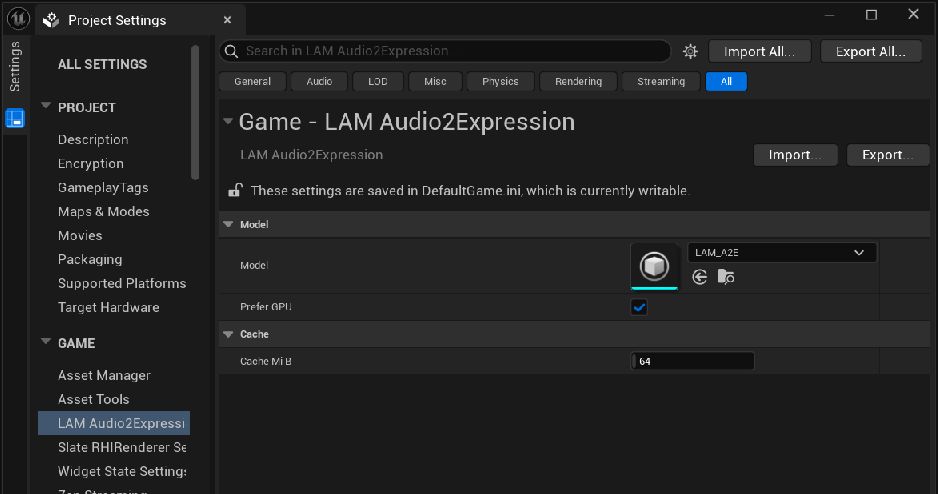
Select the model in Project Settings · Open full-size image
- Select /LAMAudio2Expression/Models/LAM_A2E in Model.
- The capture shows Prefer GPU enabled and Cache MiB 64.
Captured 2026-09-30 · UE 5.8.2 · Plugin 1860d0e · Demo 9dee71d · Operation included in v0.3.0.
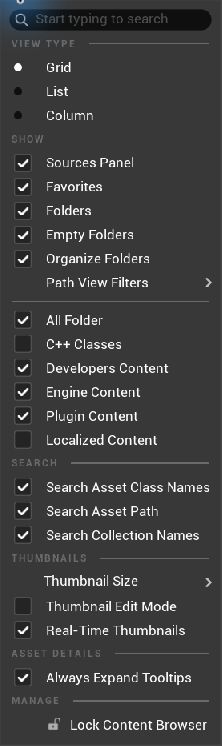
Show plugin assets in the Content Browser · Open full-size image
- Open Settings at the top right of the Content Browser and enable Show Plugin Content.
Captured 2026-09-30 · UE 5.8.2 · Plugin 1860d0e · Demo 9dee71d · Operation included in v0.3.0.
Cooking checklist
Section titled “Cooking checklist”- Confirm the Model setting in Project Settings → LAM Audio2Expression.
- Add
/LAMAudio2Expression/Modelsto Packaging → Additional Asset Directories to Cook. - When packaging the demo, add
/Game/LAMFaceDemo/Maps/LAM_FaceDemoto Maps to Cook. - Keep the plugin’s
SourceandIntermediate/Builddirectories. - Copy or extract the complete output to another short path and test the packaged application.
Distribute the entire folder, including cooked data, required DLLs, and licenses, rather than the executable alone. The published Windows demo also includes a VC++ runtime installer.
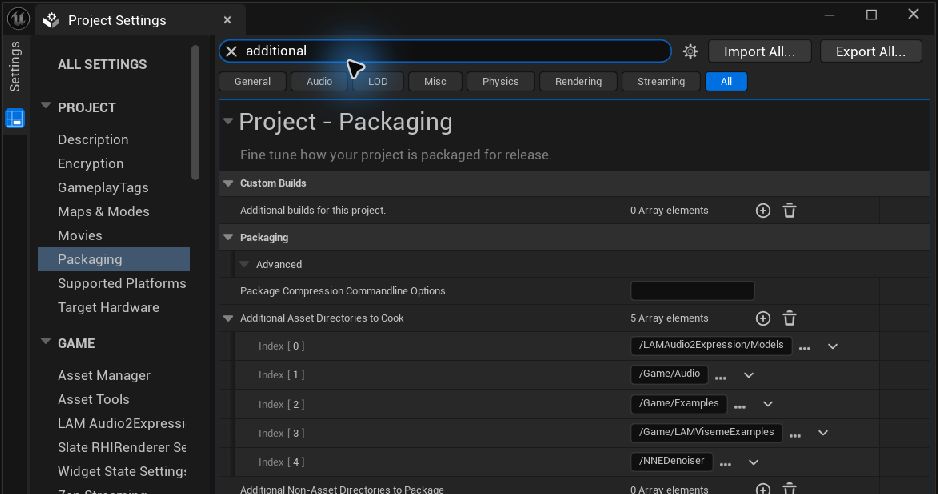
Include the model folder when cooking · Open full-size image
- Open Additional Asset Directories to Cook under Packaging.
- Add the model folder /LAMAudio2Expression/Models.
Captured 2026-09-30 · UE 5.8.2 · Plugin 1860d0e · Demo 9dee71d · Operation included in v0.3.0.
GPU and CPU
Section titled “GPU and CPU”DirectML is preferred, with CPU fallback when unavailable. Show model loading and initialization as part of your application’s loading state. The tested fallback path covers an unavailable GPU model; it is not a reproduction of physical GPU failure. See validation.
Versions and checksums
Section titled “Versions and checksums”The model manifest records provenance, pinned revisions, shapes, and SHA-256 hashes. Releases attach release-manifest.json and SHA256SUMS.txt.
Record plugin, UE, and model versions together with hashes. Prefer a new release version over silently replacing a published ZIP.
Distribution notices
Section titled “Distribution notices”MIT for original code and Apache-2.0 for upstream-derived code and model weights have different scopes. Preserve LICENSE, THIRD_PARTY_NOTICES.md, Licenses, model provenance, and conversion notes. Demo audio, visual presentation, and character assets have separate terms. See licenses and credits.
Cook saved clips (v0.3.0)
Section titled “Cook saved clips (v0.3.0)”Save Plugin 1f06ac8 baked clips after generation and include both clips and source SoundWaves in the cook. Include soft-reference-only assets explicitly, for example through Asset Manager. Saved-clip playback does not load the model, but existing model packaging settings remain unchanged. This feature is included in the v0.3.0 ZIPs.
Sequencer integration (public source)
Section titled “Sequencer integration (public source)”Public-source Plugin 1642ffa / Demo 2fbdcb3 evaluates saved Clips at Sequencer time. Playback does not load a model, decode audio for analysis or run inference. UE’s ordinary loading and decoding for audible playback still apply.
Cook the Map that references the Level Sequence. The Sequence references its Clips and SoundWaves. After building the Editor, include the ARKit / Viseme examples with these commands. The dedicated track and samples are not included in v0.3.0 ZIPs.
./Tools/package.ps1 -IncludeSequencer -Configuration Development./Tools/package.ps1 -IncludeSequencer -Configuration Shipping