ARKit 52 curves, Curve Profiles, and Viseme conversion
v0.3.0 · UE 5.8.2 / Windows x64
LAM Audio2Expression outputs 52 curves in the standard upstream order. Match them to your character’s morph target names, or consume their values in an existing rig.
Fit the output to a character
Section titled “Fit the output to a character”The Alpha input of Apply LAM ARKit Curves ranges from 0 to 1 and controls expression strength relative to the input pose. If the mouth does not move, first check that the mesh has a morph target matching jawOpen.
Create a LAMCurveProfile Data Asset and assign it to Curve Profile on the node to configure each curve:
| Setting | Purpose |
|---|---|
| Name mapping | Match a character-specific morph target name |
| Disable | Exclude a curve from application |
| Scale | Adjust the strength of a movement |
| Offset | Add a constant to the estimated value |
Curves absent from the profile remain enabled under their standard names. Adjusted values are clamped to 0–1.
result = lerp(inputCurve, clamp(estimatedValue * scale + offset, 0, 1), Alpha * Weight)Disabled curves and bone poses are left unchanged. Weight includes effects such as the stop fade. Stopping returns to the input pose over 100 ms; pausing holds the current expression.
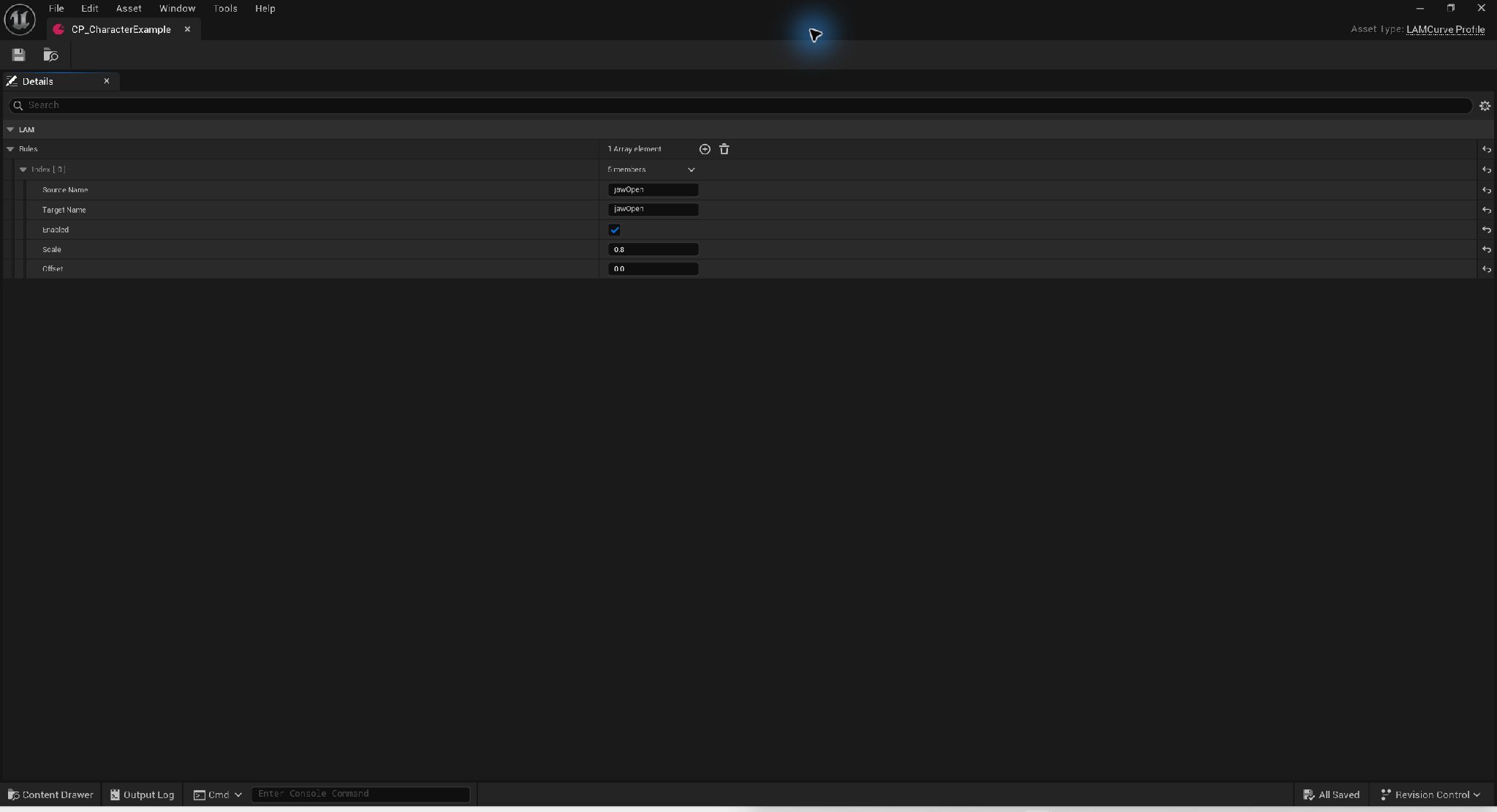
Example jawOpen adjustment with a Curve Profile · Open full-size image
- Source Name is the LAM curve; Target Name is the name on the character.
- This illustrative rule uses Enabled, Scale 0.8 and Offset 0.0.
0.8 is an illustrative adjustment, not a universal recommended value. Assign the created profile to the AnimGraph node.
Captured 2026-09-30 · UE 5.8.2 · Plugin 1860d0e · Demo 9dee71d · Operation included in v0.3.0.
Analysis settings
Section titled “Analysis settings”| Setting | Default and meaning |
|---|---|
| Style | 0; an upstream speaker-style index from 0 to 11 |
| Smooth | Enabled; five-frame Savitzky–Golay smoothing and boundary blending |
| Suppress Silent Mouth | Enabled; suppresses mouth motion when RMS stays below 0.001 for seven frames |
| Symmetrize | Disabled; left/right symmetrization |
| Auto Blink | Disabled; procedural blinking, not inferred from speech |
| Blink Seed | Random seed for reproducible procedural blinking |
Style selects an upstream model style; it is not an emotion selector. Verify the connection with defaults first, then adjust profile scales and masks for your character.
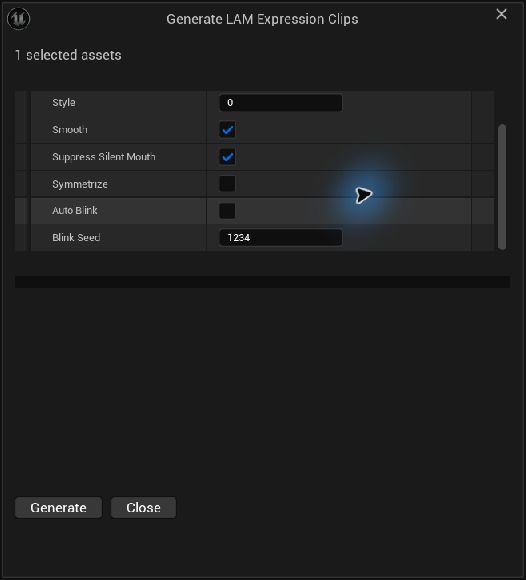
Analysis settings stored with the clip · Open full-size image
- Style is a speaker-style index from 0 to 11, not an emotion name.
- This example enables Smooth and Suppress Silent Mouth and disables Symmetrize.
- Auto Blink is disabled. Blink Seed 1234 is the seed used for automatic blinking.
After setting the options, click Generate at the bottom of the dialog. This generation dialog is included in v0.3.0.
Captured 2026-09-30 · UE 5.8.2 · Plugin 1860d0e · Demo 9dee71d · Operation included in v0.3.0.
From inference to the final look
Section titled “From inference to the final look”Analysis advances a fixed window of about 2.13 seconds in one-second steps, producing curves at 30 fps. Post-processing runs across the resulting sequence. This does not reproduce the upstream demo’s random output exactly.
You can drive Control Rig or a bone-based setup with these curves, but the plugin does not automatically retarget arbitrary rigs. See Blueprint connections and validation coverage.
Five-vowel and Oculus-compatible Visemes
Section titled “Five-vowel and Oculus-compatible Visemes”Included in v0.3.0. Apply LAM Viseme Curves converts the interpolated ARKit 52 frame into five vowel weights or 15 Oculus-compatible slots. It works with dynamic SoundWave analysis, saved clips, and live input without another model, the Oculus SDK, or reanalysis. This is mouth-shape conversion, not phoneme recognition. Public specification, reviewed 2026-09-30
- Prepare a mesh with a neutral mouth and the required morph targets. The plugin does not automatically create arbitrary character morphs.
- Enable Show Plugin Content, duplicate a profile from
/LAMAudio2Expression/Profiles/into your project, and set Target Names to the mesh’s actual morph names.Nonemeans no write. - Connect
Existing Pose → Apply LAM Viseme Curves → Output Posein AnimGraph. Set Profile and Source Component to the actor’s LAM component. An empty Source Component searches the owning actor; assign it explicitly when several components exist. - Test pause, seek, stop, neutral mouth, and your own speech material. Missing morph names produce curves but no mesh deformation.
| Profile | Conversion / intended morphs |
|---|---|
DA_JapaneseFive |
FiveVowelRules; default names A/I/U/E/O |
DA_OculusReference / DA_OculusSDK |
FiveVowelRules with 15 output names; the nine consonant slots remain zero |
DA_OculusOpenFaceFX |
TemplateFit; OpenFaceFX recipe, SDK names such as ih/oh/ou |
DA_OculusTalkingHead |
TemplateFit; TalkingHead recipe, prefixed names such as viseme_I/viseme_O/viseme_U |
Output names and conversion mode are independent settings. For a five-vowel-only mesh, keep FiveVowelRules. With no Profile assigned, the node uses the default five-vowel settings and A/I/U/E/O names. In FiveVowelRules, adjust neutral Input Corrections, then Activation, Width / Roundness / OpenSplit, and finally Vowel Gains. These are shape-based approximations; they do not guarantee phonetic accuracy across characters.
Combining upper-face and mouth animation
Section titled “Combining upper-face and mouth animation”Use DA_UpperFaceOnly on the ARKit node if LAM should also drive eyes and brows:
Existing Pose → Apply LAM ARKit Curves (DA_UpperFaceOnly) → Apply LAM Viseme Curves (character Profile) → Output PoseUpperFaceOnly disables writing jaw*, mouth*, and tongueOut; it does not clear mouth curves already present in the input pose. Avoid simultaneously driving the same mouth through a full ARKit node or Set Morph Target. Pausing holds the frame, seeking follows the new time, and stopping uses the component’s 100 ms fade back to the input pose. Conversion adds no temporal smoothing.
TemplateFit settings and limits
Section titled “TemplateFit settings and limits”ConversionMode=TemplateFit fits 14 non-neutral weights to the selected forward recipe, with nonnegative weights whose sum is at most 1. sil is the residual 1 − sum, not an audio-silence detector. Set its Target Name to None if no neutral morph is needed.
For an unavailable input channel such as tongueOut, set Input Corrections → FitWeight=0. Scale=0 instead tells the fitter that the observed value is zero. Use Viseme Gains for the 14 output gains; sil’s gain is ignored. Vowel Gains and the opening / width / roundness thresholds belong to FiveVowelRules. Validate the profile with Validate Assets after changes.
Both template matrices have rank 11, so 14 weights cannot always be recovered uniquely. TalkingHead’s CH and RR recipes are identical and share weight equally before gains. Expressions such as smiles also affect mouth shape. TemplateFit approximates shapes; it does not reproduce Oculus audio inference or reliably identify spoken consonants. See the pinned recipes and full constraints.
Read converted weights in Blueprint
Section titled “Read converted weights in Blueprint”Get Current Expression Frame → Convert ARKit To Visemes (Frame, Profile) → Get Vowel Weights / Get Viseme WeightThe fixed 15-slot order is sil, PP, FF, TH, DD, kk, CH, SS, nn, RR, aa, E, ih, oh, ou. Check bValid before custom application; Values do not include Weight, so apply Alpha × Weight once. Invalid frames return 15 zeros, including sil. External ARKit input must use the order returned by Get ARKit Curve Names, with 52 finite values and valid time / weight metadata.
See demo assets and release validation. The plugin bundles the MIT-licensed recipe data and notices; it does not require the OpenFaceFX, TalkingHead, Blender, or Oculus runtimes. Credits