Install the UE5 lip-sync plugin
v0.3.0 · UE 5.8.2 / Windows x64
This guide installs the LAM Audio2Expression lip-sync plugin in Unreal Engine 5 (UE5). The packaged v0.3.0 build targets UE 5.8.2 / Windows x64. After enabling the plugin, follow the Blueprint lip-sync connections. To try the animation first, use the Windows demo.
Requirements
Section titled “Requirements”- Windows x64 and Unreal Engine 5.8.2.
- ARKit 52 morph targets or a curve-driven rig; five-vowel and Oculus-compatible rigs can use Viseme conversion.
- A standard SoundWave imported into Unreal Engine.
The release includes precompiled Editor Development and Game Development / Shipping data, plus C++ source. Other UE versions require a source rebuild.
Install the model-included ZIP
Section titled “Install the model-included ZIP”- Download the v0.3.0 plugin ZIP.
- Close the UE editor and extract the entire archive.
- Place
LAMAudio2Expressionat<Project>/Plugins/LAMAudio2Expression. When upgrading, move the old plugin folder elsewhere before replacing it. - Enable LAM Audio2Expression in UE and restart. The required NNE ORT and AudioCapture plugins are enabled as dependencies.
- In Project Settings → LAM Audio2Expression, confirm that Model is
/LAMAudio2Expression/Models/LAM_A2E.
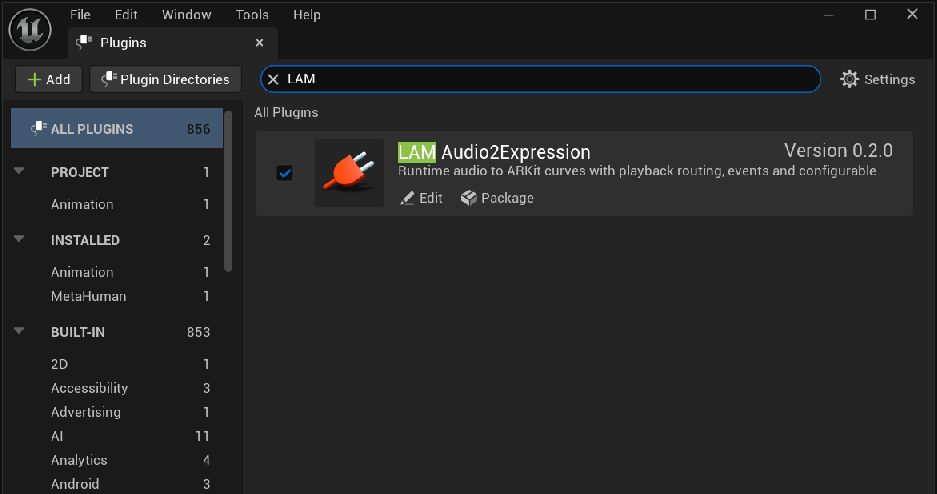
Enable LAM Audio2Expression in Plugins · Open full-size image
- Enter LAM in the search field.
- Enable the checkbox and restart UE if prompted.
Version 0.2.0 is the captured public-source descriptor label. The v0.3.0 release ZIP updates it to 0.3.0. The capture commit is recorded below.
Captured 2026-09-30 · UE 5.8.2 · Plugin 1860d0e · Demo 9dee71d · Operation included in v0.3.0.
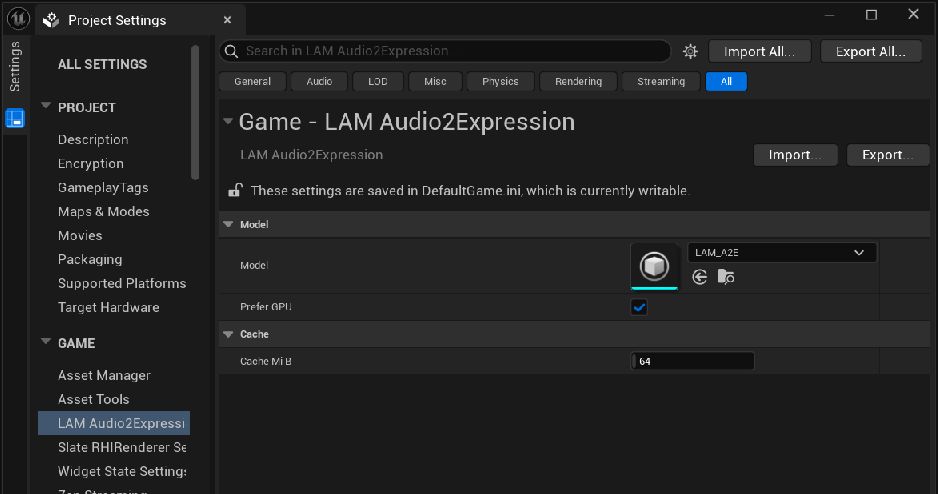
Select the model in Project Settings · Open full-size image
- Select /LAMAudio2Expression/Models/LAM_A2E in Model.
- The capture shows Prefer GPU enabled and Cache MiB 64.
Captured 2026-09-30 · UE 5.8.2 · Plugin 1860d0e · Demo 9dee71d · Operation included in v0.3.0.
Play your first clip
Section titled “Play your first clip”Add a LAMAudio2ExpressionComponent to an Actor. Pass it and a SoundWave to Analyze SoundWave Async. Connect the Clip returned by Completed to Play Expression Clip.
In the Animation Blueprint, place Apply LAM ARKit Curves between the existing pose and Output Pose. Set Source Component to the same component. Continue with the Blueprint guide for the complete connection flow.
The first analysis waits for the roughly 384 MiB model to load and inference to initialize. Runtime use needs no Python, external inference server, or additional model download.
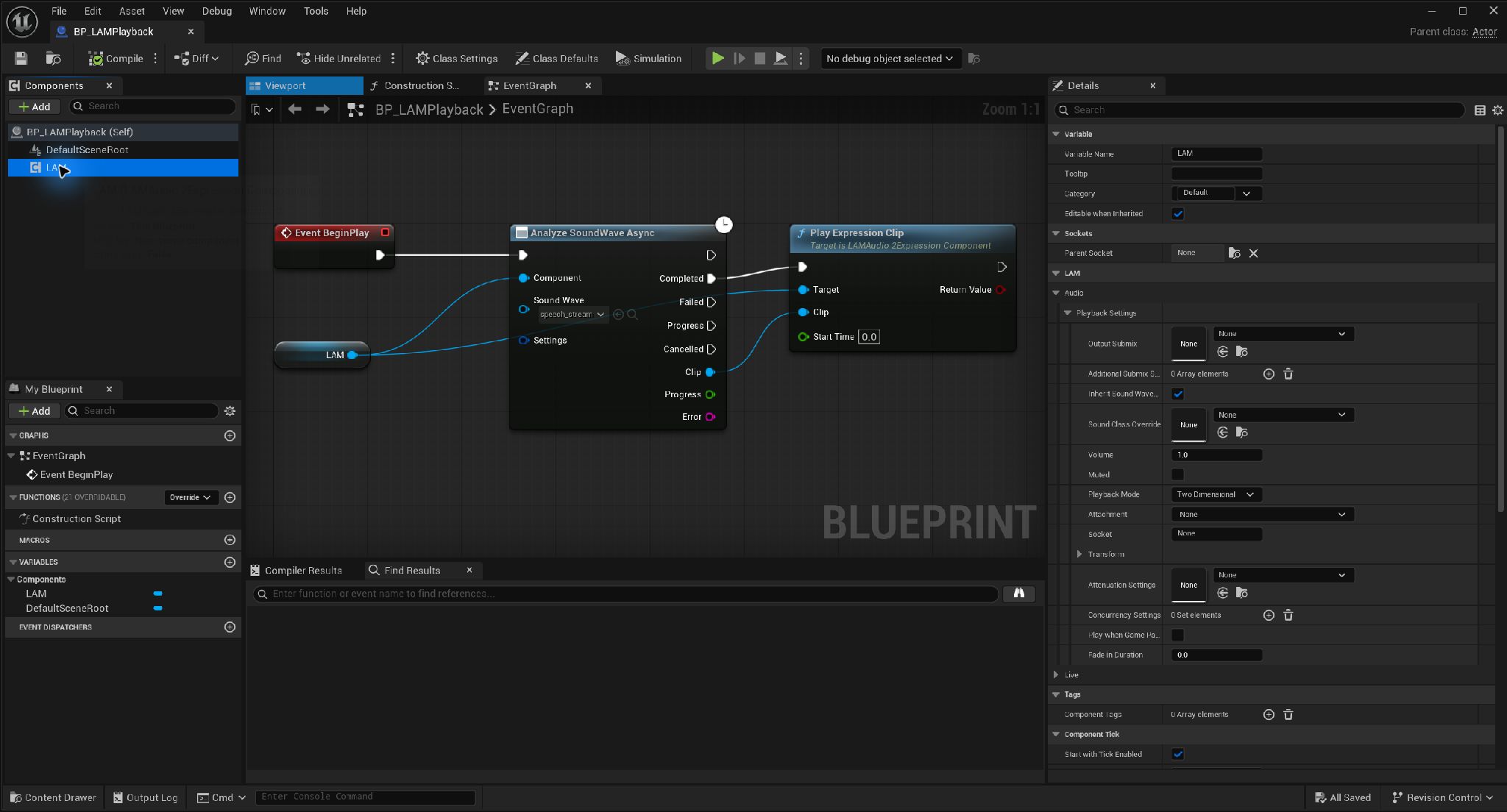
Add a LAM component to the Actor · Open full-size image
- Use Add to find and add LAM Audio2Expression Component.
- This example names the added component LAM.
Captured 2026-09-30 · UE 5.8.2 · Plugin 1860d0e · Demo 9dee71d · Operation included in v0.3.0.
Package your project
Section titled “Package your project”Add /LAMAudio2Expression/Models to Project Settings → Packaging → Additional Asset Directories to Cook. Check this first if the model works in the editor but cannot be found in a packaged application. See models and packaging.
The plugin alone does not include a face, speech samples, or demo map. Use the demo project for a preconfigured character.
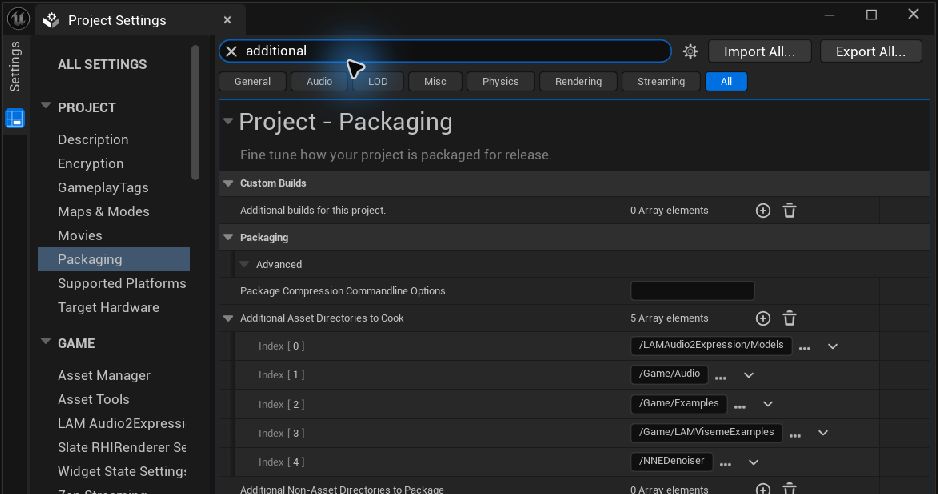
Include the model folder when cooking · Open full-size image
- Open Additional Asset Directories to Cook under Packaging.
- Add the model folder /LAMAudio2Expression/Models.
Captured 2026-09-30 · UE 5.8.2 · Plugin 1860d0e · Demo 9dee71d · Operation included in v0.3.0.
Sequencer integration (public source)
Section titled “Sequencer integration (public source)”The LAM Dialogue track is not included in v0.3.0 ZIPs. Build the Editor from public source Plugin 1642ffa / Demo 2fbdcb3 using the Sequencer setup guide. Existing release ZIP versions and download targets are unchanged.