Implement UE5 lip sync in Blueprint
v0.3.0 · UE 5.8.2 / Windows x64
Implement audio lip sync in Unreal Engine 5 (UE5) by connecting analysis, playback, and facial-curve application as separate steps. Install the plugin first. Your Actor needs a LAMAudio2ExpressionComponent, and the character mesh needs an Animation Blueprint. Map the ARKit curves or Visemes to that mesh.
Analyze a SoundWave
Section titled “Analyze a SoundWave”BeginPlay or another event → Analyze SoundWave Async(Component, SoundWave, Settings) Completed(Clip) → Play Expression Clip(Clip, StartTime=0) Progress → Update loading UI Failed → Display Error Cancelled → Close loading UISupported inputs are standard mono / stereo SoundWaves, 8–192 kHz, up to 300 seconds. External WAV / MP3 files cannot be passed directly: import them into UE as SoundWaves first.
Pass the Clip output of Completed to the playback node. Keep the Clip in a Blueprint variable if other Actors will reuse it. Use Cancel Analysis to cancel analysis. Starting another analysis on the same component cancels its previous analysis.
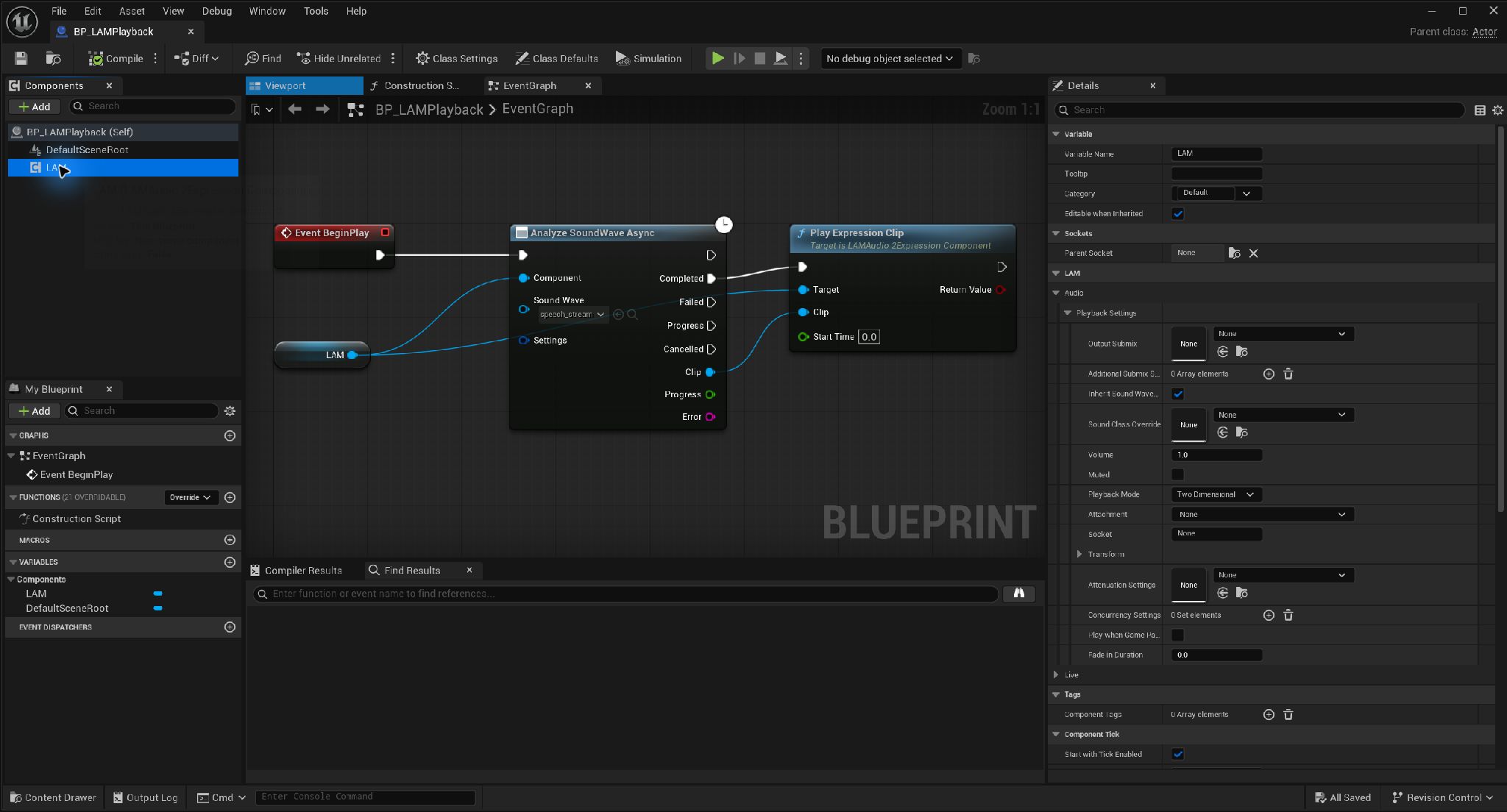
Add a LAM component to the Actor · Open full-size image
- Use Add to find and add LAM Audio2Expression Component.
- This example names the added component LAM.
Captured 2026-09-30 · UE 5.8.2 · Plugin 1860d0e · Demo 9dee71d · Operation included in v0.3.0.
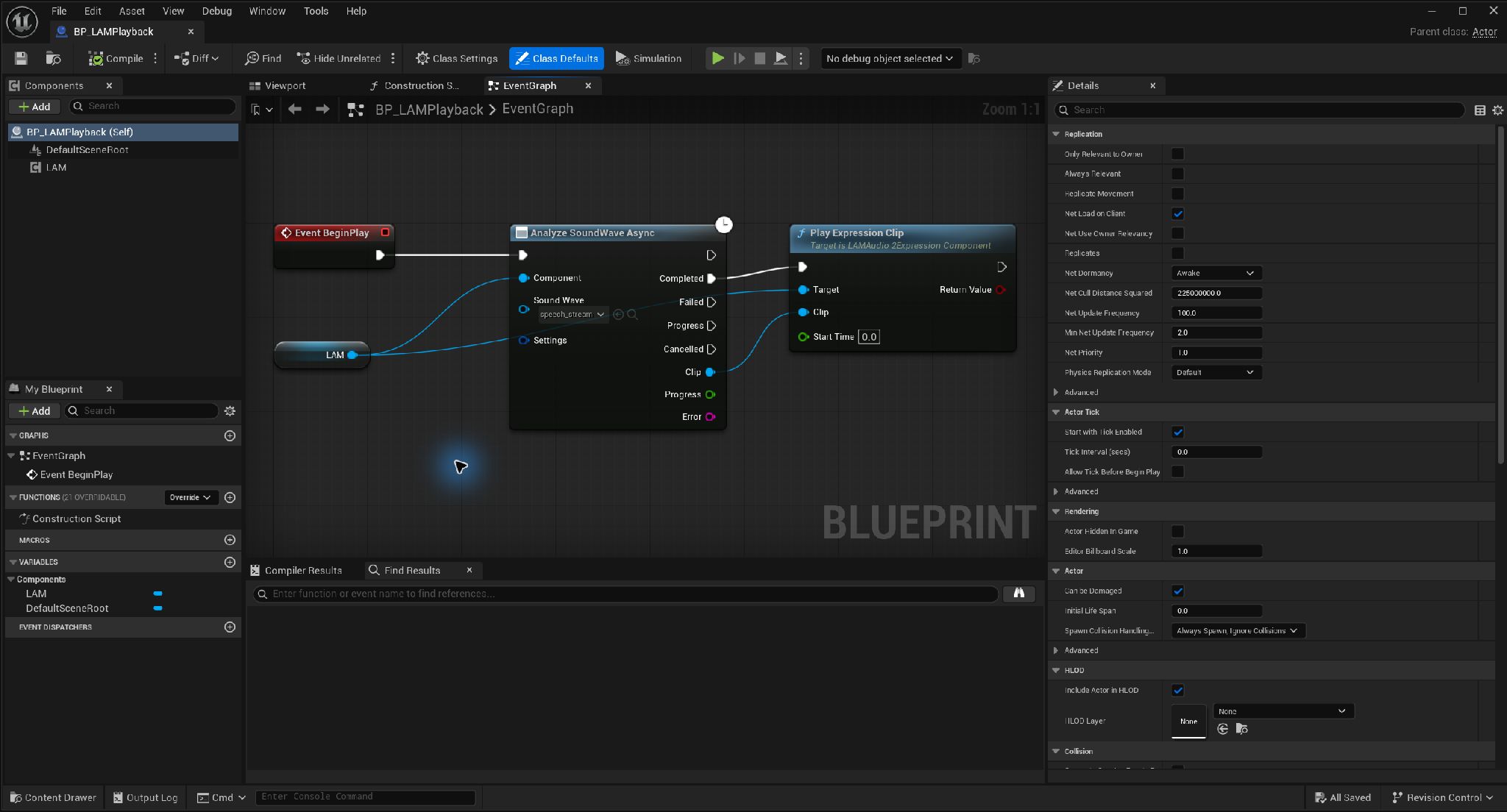
Play from the Completed output of asynchronous analysis · Open full-size image
- Pass the LAM component and a SoundWave to the analysis node.
- Connect the Completed execution pin and Clip output to the playback node.
This is a minimal wiring example. Handle Failed, Cancelled and Progress in your application.
Captured 2026-09-30 · UE 5.8.2 · Plugin 1860d0e · Demo 9dee71d · Operation included in v0.3.0.
Apply expressions in the AnimGraph
Section titled “Apply expressions in the AnimGraph”Existing pose → Apply LAM ARKit Curves → Output Pose- Open your character’s Animation Blueprint.
- Connect
Apply LAM ARKit Curvesbetween the existing pose and Output Pose. - Set Source Component to the LAM component that performs analysis and playback.
- Set Alpha between 0 and 1. Use a Curve Profile if your curve names differ.
If Source Component is empty, the node searches the SkeletalMesh’s owning Actor. Specify it explicitly when that Actor has multiple LAM components.
A mesh can consume standard curve names such as jawOpen through matching morph targets. For a bone-driven rig, route the curves into your existing rig or Control Rig. The plugin does not infer a custom bone arrangement automatically.
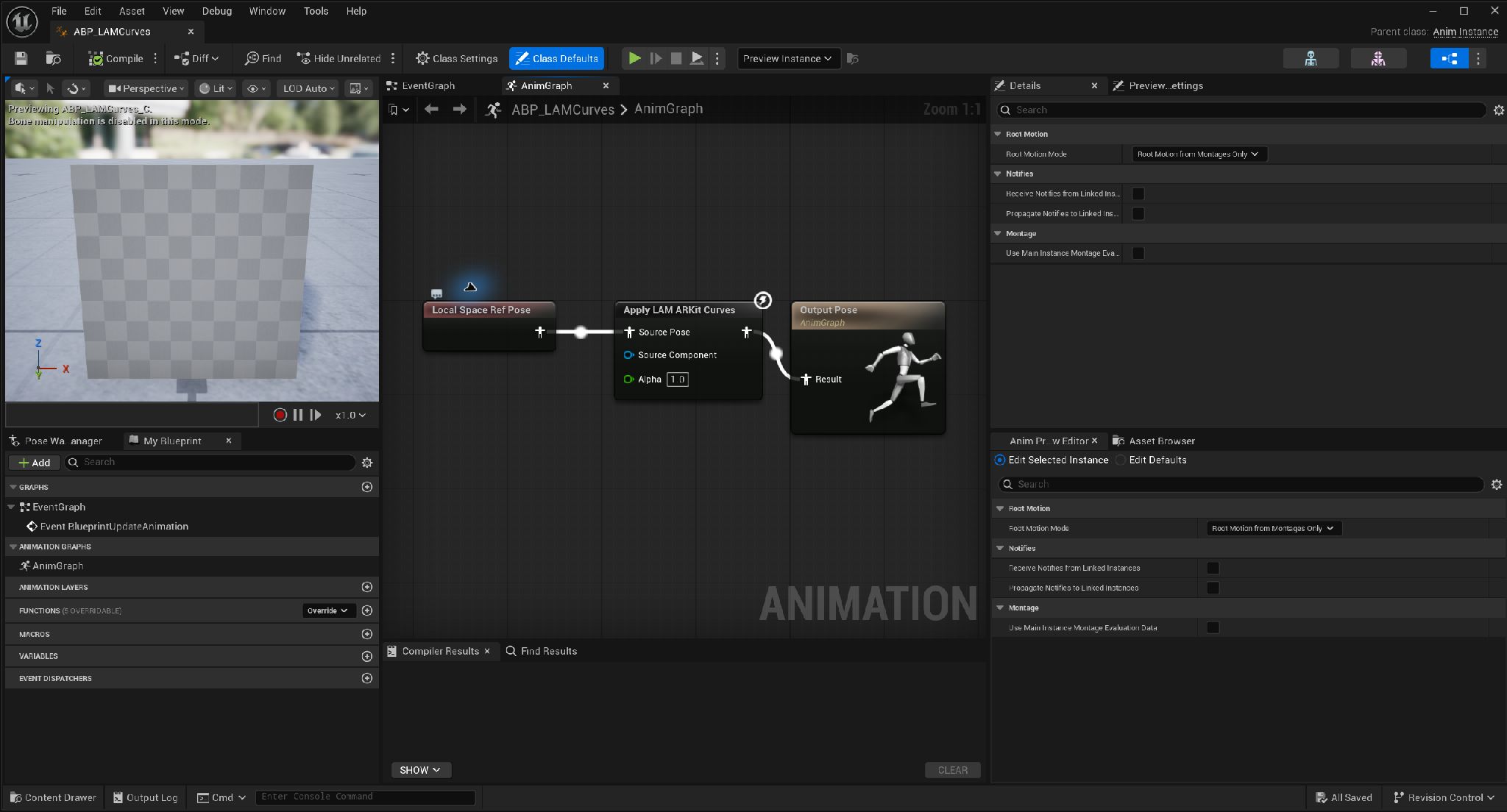
Apply ARKit expression curves to the input pose · Open full-size image
- Ref Pose is a placeholder in this example. Supply your existing animation pose.
- Assign the analysis/playback LAM to Source Component. If empty, the owning Actor is searched.
- Connect the output to Output Pose.
Captured 2026-09-30 · UE 5.8.2 · Plugin 1860d0e · Demo 9dee71d · Operation included in v0.3.0.
Playback and state
Section titled “Playback and state”Pause, Resume, Stop, and Seek control audio and expressions together. Pause holds the expression; stop returns to the input pose over 100 ms. See playback controls.
Get Current Expression Framereturns time, 52 values, Validity, and the applied Weight.Get ARKit Curve Valuereturns a named estimated curve value. Stop-fade Weight is separate.
Connected examples
Section titled “Connected examples”The distributed project includes /Game/Examples/BP_LAMPlayback for async analysis and playback, and /Game/Examples/ABP_LAMCurves for the AnimGraph. The latter uses a test skeleton; copy its node arrangement into your own AnimBP.
In the public Blueprint face-demo source, start at 02_Analyze_And_Play in BP_FaceDemo. That implementation is included in the v0.3.0 ZIPs. See the demo version notes.
Use a saved clip (v0.3.0)
Section titled “Use a saved clip (v0.3.0)”For recorded audio, bake a SoundWave clip in the editor and save the asset. Pass the loaded clip directly to a playback node to skip runtime analysis. This feature is included in the v0.3.0 ZIPs.
In latest source Plugin 1860d0e, Lipsync also finds these nodes. For the v0.3.0 ZIP use LAM or the displayed node name. For a vowel / Oculus rig, replace the mouth application with Apply LAM Viseme Curves.
Sequencer integration (public source)
Section titled “Sequencer integration (public source)”The public-source LAM Dialogue track uses the same Apply LAM ARKit Curves / Apply LAM Viseme Curves nodes. Do not add Play Expression Clip events for this track. With multiple candidates, match the track’s Target Components to the AnimBP’s Source Component. Is Controlled By Sequencer can gate ordinary playback starts. The dedicated track is not in v0.3.0 ZIPs.