Run the Windows demo or open the UE project
v0.3.0 · UE 5.8.2 / Windows x64
Run the Windows application
Section titled “Run the Windows application”- Download the model-included Windows demo.
- Extract the entire archive to a short path such as
C:\LAMDemoand launchLAMDemo.exe. - Choose a speech button on the left, or press 1–6. Expressions and audio play after analysis completes.
The model, plugin, character, and six speech samples are included. You do not need the UE editor or Python. If the VC++ runtime is missing, run the included Engine/Extras/Redist/en-us/vc_redist.x64.exe.
Controls
Section titled “Controls”| Key | Action |
|---|---|
| 1–6 | Select a speech sample |
| Space | Pause / resume |
| R | Replay from the beginning |
| V / − / + | Mute / lower volume / raise volume |
| O / F | Switch output submix / fade out and stop |
| M / I | Start or stop microphone / cycle 100, 333, 1000 ms inference intervals |
| Alt + F4 | Exit |
Microphone input needs Windows microphone permission. The plugin does not monitor the captured audio through speakers. Long-running use with a physical microphone remains unverified.
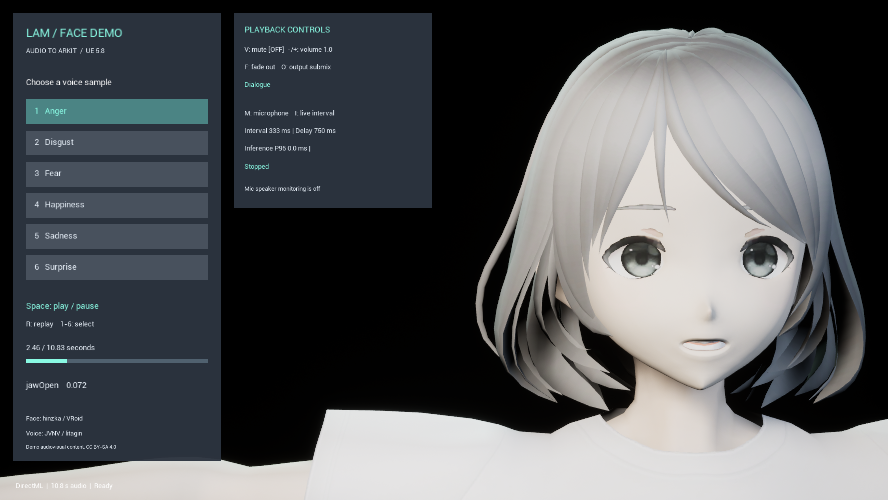
Controls in the published demo screenshot · Open full-size image
- Select audio using buttons 1–6. Their labels classify the speech samples.
- Space pauses/resumes; R replays from the beginning.
- Inspect volume, output and live status. The values belong to the existing capture, not a new measurement.
Character: hinzka / VRoid and pixiv. Speech: JVNV / litagin. See the licenses page for usage conditions.
Existing public image (capture date unknown), reused unchanged from Demo 275a683. Image source · Credits and usage conditions

Edit the UE project
Section titled “Edit the UE project”Extract the entire model-included UE project. Open LAMDemo.uproject in UE 5.8.2, load /Game/LAMFaceDemo/Maps/LAM_FaceDemo, and press Play.
See the credits and terms for the screenshot and demo assets.
Release demo versus Blueprint source demo
Section titled “Release demo versus Blueprint source demo”Start with 02_Analyze_And_Play in BP_FaceDemo: SelectSample → cancel previous work → Analyze SoundWave Async → Completed → Play Expression Clip.
| Blueprint | Responsibility |
|---|---|
| BP_FaceDemo | Analysis, playback, input, state events |
| BP_FaceDemoHUD | Canvas-based UI and click handling |
| BP_FaceDemoGameMode | Selects the HUD |
| ABP_Face52 | Applies expressions with Apply LAM ARKit Curves |
These assets live under Content/LAMFaceDemo. To move the demo to another project, install the plugin and use Content Browser’s Migrate command. Keep the asset attribution and licenses. You do not need the demo assets when integrating your own character.
Viseme and baked-clip examples
Section titled “Viseme and baked-clip examples”v0.3.0 also includes five-vowel / Oculus template examples and baked-clip examples. Normal face-demo startup still uses ARKit 52. For a vowel rig, inspect /Game/LAMVisemeExamples/ABP_LAMVisemes and its Fcl_MTH_A/I/U/E/O targets. OpenFaceFX and TalkingHead examples use ABP_OpenFaceFX and ABP_TalkingHead in that folder. The test script switches the mesh and AnimBP only when the relevant test flag is supplied; these are not extra keyboard modes in the normal HUD.
See Viseme setup, saved-clip examples, and the v0.3.0 validation record.