Microphone and PCM lip sync in UE5
v0.3.0 · UE 5.8.2 / Windows x64
Generate live lip sync in UE5 from a microphone or external PCM stream. This page covers the Blueprint start / stop flow and timing settings; it does not analyze an entire SoundWave in advance. Live inference and offline analysis share one dedicated worker. For recorded dialogue, use baked SoundWave clips.
Microphone input
Section titled “Microphone input”Start Microphone(Settings, DeviceIndex=-1) selects the default recording device. Windows microphone permission is required. Call Stop Microphone to finish.
The plugin does not monitor captured audio through speakers. Startup requires model loading and initialization. You can analyze a SoundWave beforehand to load the model asset.
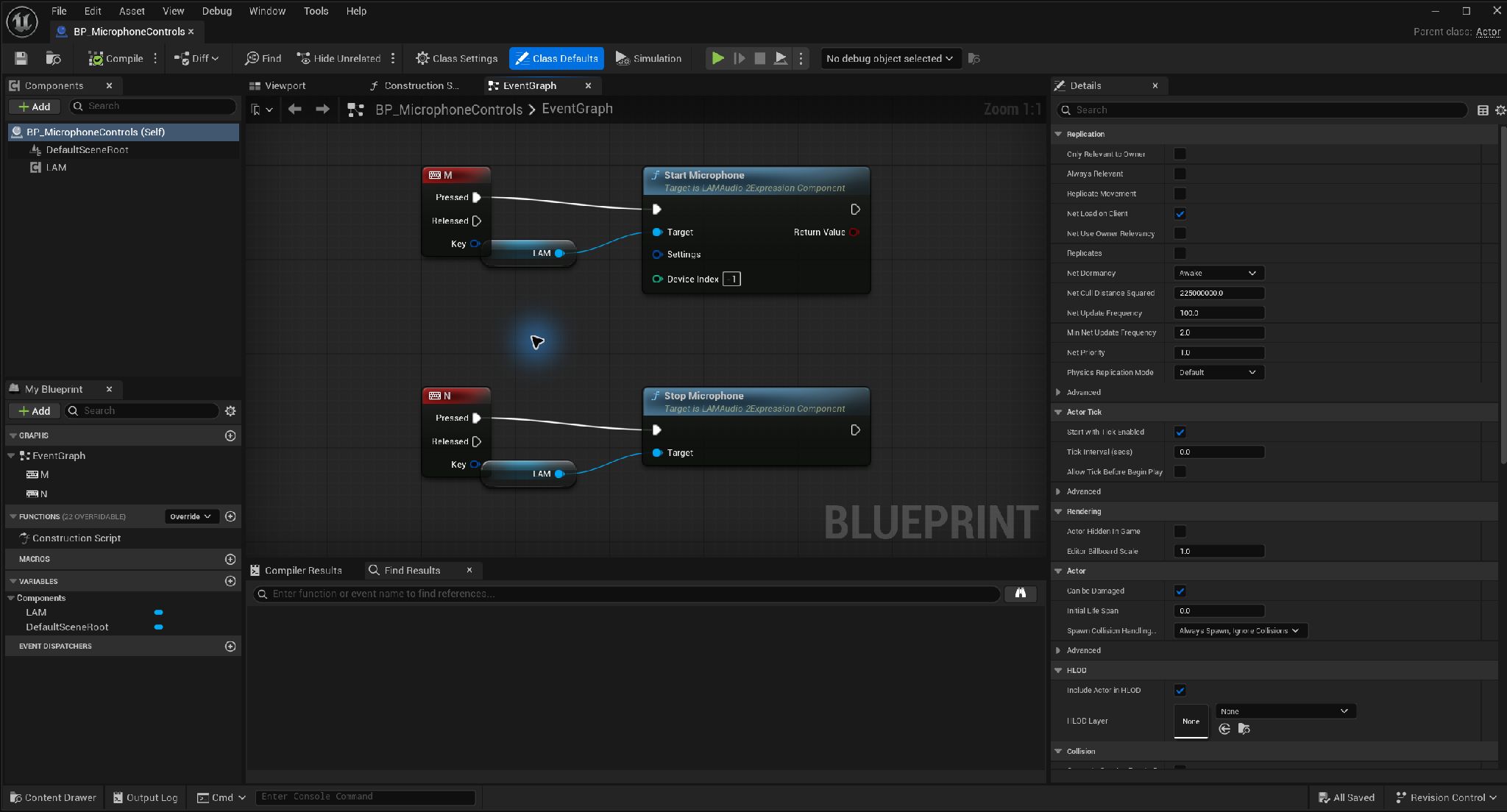
Start and stop microphone input · Open full-size image
- Device Index -1 on Start Microphone selects the default device.
- Call Stop Microphone on the same LAM to finish.
This capture illustrates wiring only; no microphone recording or runtime test was performed. Enable Actor input when using keyboard events.
Captured 2026-09-30 · UE 5.8.2 · Plugin 1860d0e · Demo 9dee71d · Operation included in v0.3.0.
Supply external PCM
Section titled “Supply external PCM”Start PCM Stream(Settings) → Repeat on the game thread: Push PCM Audio(InterleavedPCM, SampleRate, Channels) → Stop Microphone- Interleaved mono / stereo float samples in the range −1 to 1.
- Sample rates of 8–192 kHz, at most two seconds per call.
- Restart the stream when changing sample rate.
- Send small chunks regularly instead of batching large chunks.
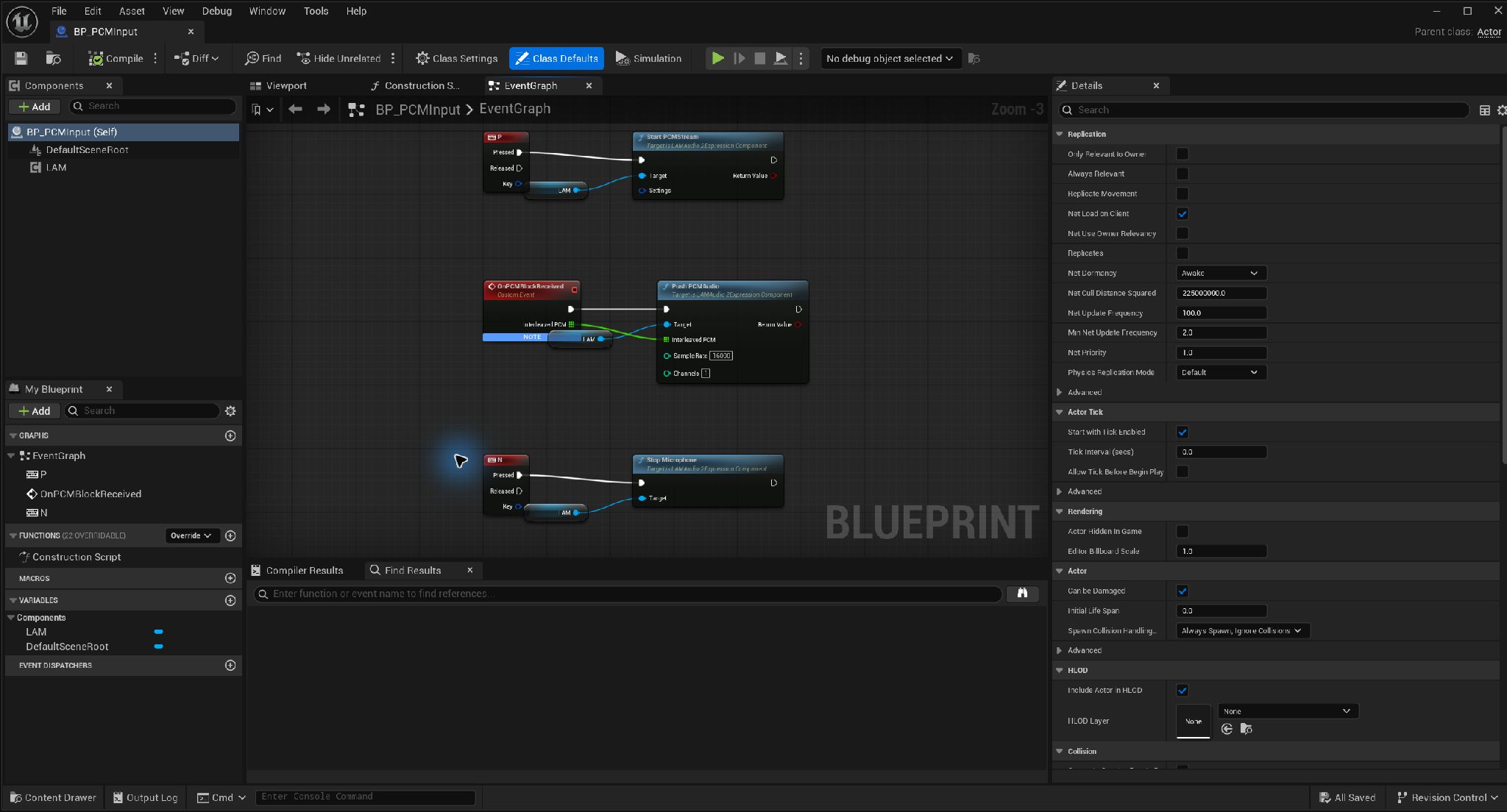
Submit external PCM in small blocks · Open full-size image
- Call Start PCMStream first.
- Have your PCM producer invoke the event repeatedly on the game thread. This example uses a float array at 16,000 Hz, mono.
- Use Stop Microphone to end this stream as well.
OnPCMBlockReceived is an illustrative custom event and is not called automatically. Match Sample Rate and Channels to the actual data.
Captured 2026-09-30 · UE 5.8.2 · Plugin 1860d0e · Demo 9dee71d · Operation included in v0.3.0.
Inference interval and presentation delay
Section titled “Inference interval and presentation delay”Set Live Inference Interval takes milliseconds. The range is about 33.3–1000 ms, rounded internally to 1–30 frames. The default is 10 frames, about 333.3 ms. A live change applies to the next inference job. Get Live Inference Interval returns the rounded request.
Presentation Delay is the requested minimum delay: default 0.75 seconds, configurable from 0.4 to 2 seconds. The effective value is the larger of that minimum and “interval + result-latency P95 + one frame,” capped at two seconds. During a session it only increases, avoiding backwards presentation time. A reduction is recalculated on the next start.
A shorter interval requests more frequent updates. Actual real-time behavior depends on hardware and competing work; the requested interval is not a guaranteed result delivery time.
Inspect runtime state
Section titled “Inspect runtime state”Get Live Metrics returns Actual Interval, Effective Presentation Delay, Inference P95, Result Latency P95, Initialization, Dropped Intervals, Backend, and State. P95 uses the last 60 samples; zero during preparation means not yet measured. Result Latency includes worker queueing; Initialization is reported separately.
On Live State Changed reports Preparing, Running, Lagging, Failed, or Stopped. The pending input queue is capped at two seconds, with one inference job per session at a time. When behind, the system drops old pending work and catches up to the latest position. Without a result, it holds for 100 ms and then returns expressions over another 100 ms.
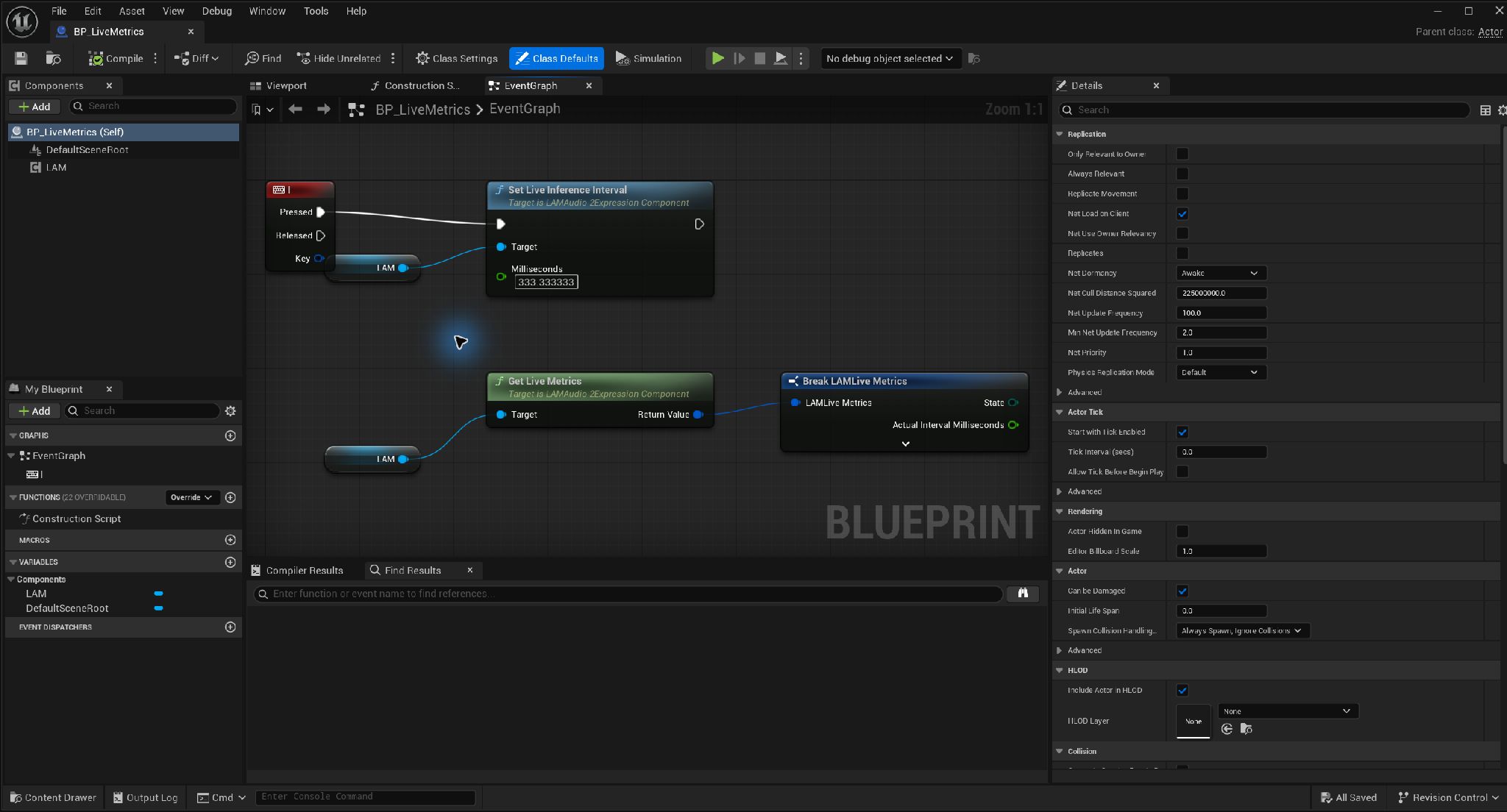
Set the inference interval and read metrics · Open full-size image
- Pass the requested interval in Milliseconds. 333.333333 is a configured value, not a timing measurement.
- Break the Get Live Metrics result to read State and Actual Interval. Expand the downward arrow for the other fields.
Connect the outputs to UI or logging to evaluate the values. Those consumers are omitted here. Enable Actor input if using the I key.
Captured 2026-09-30 · UE 5.8.2 · Plugin 1860d0e · Demo 9dee71d · Operation included in v0.3.0.
Tested coverage
Section titled “Tested coverage”Published tests cover continuous PCM, interval changes during streaming, CPU / DirectML, and worker contention. Physical microphone capture, disconnection, and long-running operation remain unverified. Measure your target environment rather than treating functional-test P95 values as an operational guarantee. See validation.
Sequencer integration (public source)
Section titled “Sequencer integration (public source)”When public-source LAM Dialogue acquires control, running microphone / PCM input is interrupted. Start Microphone / Start PCM Stream are rejected while controlled. Check Is Controlled By Sequencer, then explicitly start the required input after the Sequence releases control; interrupted input never resumes automatically. This integration is not in v0.3.0 ZIPs.