Build from source and prepare a release
v0.3.0 / public source Plugin 1642ffa / Demo 2fbdcb3 · UE 5.8.2 / Windows x64
This page targets the published source snapshot. For immediate use, install the model-included v0.3.0 release. The Blueprint face demo, baked clips, and Viseme conversion are included in v0.3.0.
Development environment
Section titled “Development environment”Install UE 5.8.2, Visual Studio 2022 with C++ development tools, Python 3.10, and Git. The examples assume UE is installed at D:\Unreal\UE_5.8; replace that with your engine path.
Reproduce the documented source version
Section titled “Reproduce the documented source version”git clone --recurse-submodules https://github.com/yeczrtu/LAMAudio2Expression-UE-Demo.gitcd LAMAudio2Expression-UE-Demogit checkout 2fbdcb3758f89883af6c4659f835ea843502baa0git submodule update --init --recursive./Tools/setup.ps1 -Engine D:\Unreal\UE_5.8This checkout reproduces the referenced version. Create a working branch if you want to save changes. Existing clones also need their submodules initialized.
Setup uses a dedicated .work/venv. It retrieves the pinned model, verifies SHA-256, exports ONNX, compares numerical output, and generates the UE model and test assets. Python, PyTorch, and network access are development-time requirements; the distributed application’s inference does not need them.
Build and test
Section titled “Build and test”Run these commands from the project root:
./Tools/test.ps1 -Engine D:\Unreal\UE_5.8./Tools/package.ps1 -Configuration Development./Tools/package.ps1 -Configuration Shipping./Tools/smoke.ps1 -Configuration Development./Tools/smoke.ps1 -Configuration Shipping./Tools/test_playback_controls.ps1 -Configuration Shipping./Tools/test_face_demo.ps1 -Configuration Shipping -OutputDirectory Artifacts/BPChecks-ShippingPlayback-control and face-demo tests also support Editor and Development configurations. The Shipping executable is Artifacts/Shipping/Windows/LAMDemo.exe. Distribute the entire Windows folder.
The checkout above pins current public Demo 2fbdcb3 and Plugin 1642ffa. To reproduce the v0.3.0 release source instead, checkout Demo f3b6f13e98d75d6e23933669adee79319ef3363f, then run git submodule update --init --recursive; its plugin is 1f06ac858413090f00c3f5bb955e1d73653ef74e. Later source adds Lipsync search keywords and README updates, plus the LAM Dialogue track, examples and validation tools.
Assemble release archives
Section titled “Assemble release archives”- Generate the model and verify hashes against
Docs/model-manifest.json. - Build the Win64 plugin with
RunUAT.bat BuildPlugin. Use a new, short output path: this command empties its output directory. - Create a disposable demo-project copy. Generate release examples using
Tools/prepare_release_examples.py, copy the validated model, and produce a Shipping build with BuildCookRun. - Assemble the distribution. Replace the angle-bracket placeholders with actual paths:
python Tools/assemble_release.py --version 0.3.0 --plugin <BuildPlugin-output> --project <disposable-project-directory> --shipping <Shipping-archive>/Windows --output <new-output-directory>The source script still defaults to 0.2.0, so pass --version 0.3.0 explicitly. The published release manifest records packaging-only edits: Version=3, VersionName=0.3.0, BuildPlugin’s Installed=true, and the README-FIRST release label. Apply and check those changes only in the disposable distribution copy, including the script’s hard-coded README-FIRST text / URL. The release used unchanged C++ sources. Inspect every assembled archive and record its source commits, validation, and SHA-256; the version flag alone is not a complete reproduction of the release packaging.
The new output directory receives plugin, editable-project, and Windows-demo ZIPs, plus a manifest and checksums. Extract each archive to another short path and verify the model, face demo, and playback controls before publishing matching version tags in both repositories. The linked release source below provides the detailed rules for the disposable project copy.
Develop and validate baked clips (v0.3.0)
Section titled “Develop and validate baked clips (v0.3.0)”This feature was added in Plugin 1f06ac8 / Demo f3b6f13. Build the Editor target before running dedicated checks for generation, regeneration, saving, and playback in another process. The new -IncludeBaked option includes the test map in Development / Shipping packages. See commands and generated assets. The v0.3.0 release ZIPs include this feature.
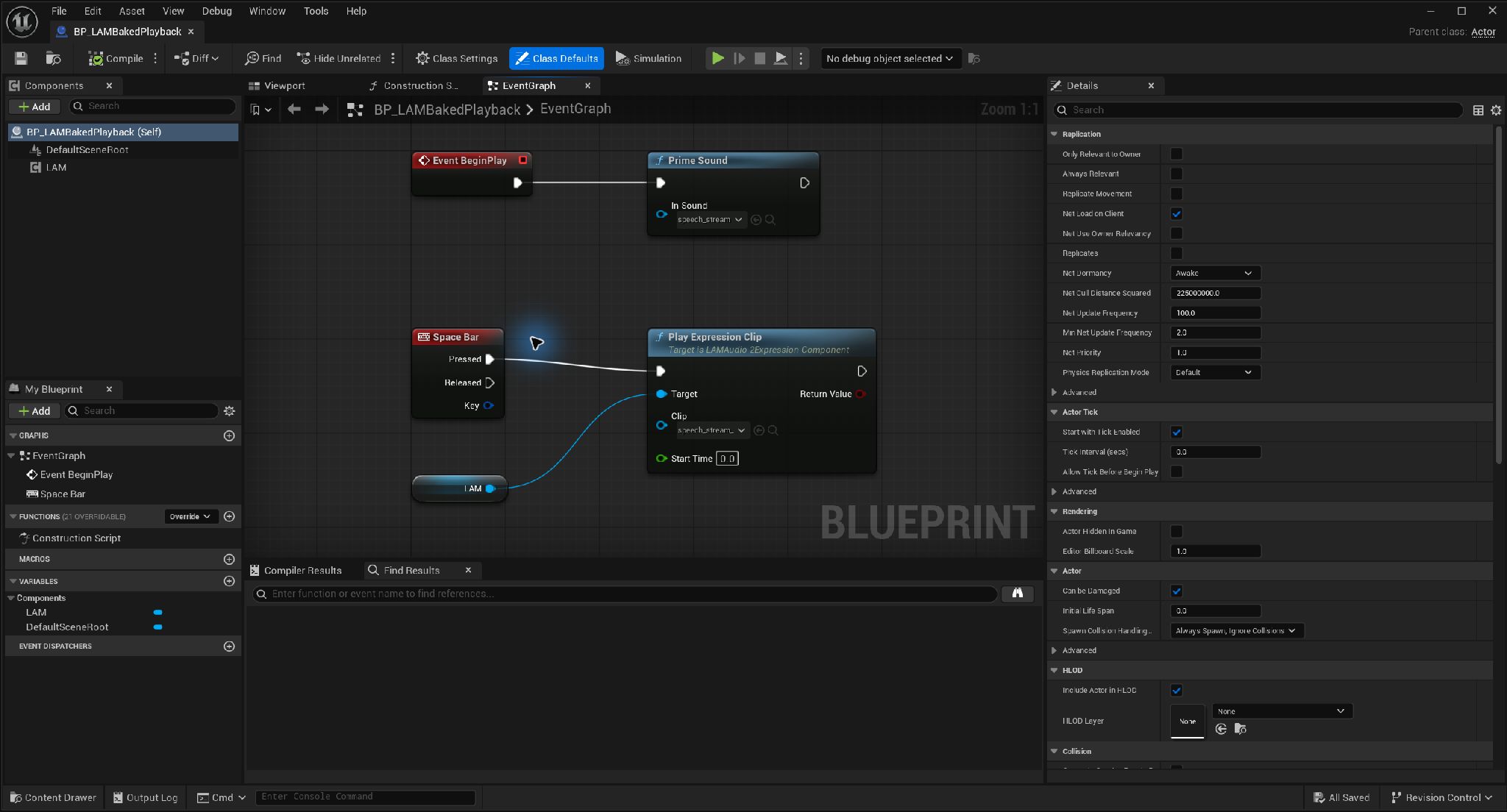
Prime audio and play a saved clip · Open full-size image
- Pass the original SoundWave to Prime Sound and request priming early.
- Set Clip on Play Expression Clip to the saved speech_stream_LAMClip.
Asset names are truncated by the field width. Prime Sound does not signal completion. An Actor using keyboard events must be configured to receive input.
Captured 2026-09-30 · UE 5.8.2 · Plugin 1860d0e · Demo 9dee71d · Operation included in v0.3.0.
Sequencer integration (public source)
Section titled “Sequencer integration (public source)”The pinned public source includes LAM Dialogue, ARKit / Viseme examples in /Game/LAMSequencerExamples, and MRQ_Temporal1 / MRQ_Temporal8. These are not included in v0.3.0 ZIPs. Regeneration only creates missing assets. Analysis needs audio decoding, so do not pass -nosound.
& 'D:/Unreal/UE_5.8/Engine/Binaries/Win64/UnrealEditor-Cmd.exe' ./LAMDemo.uproject -unattended -RenderOffscreen "-ExecutePythonScript=$PWD/Tools/build_sequencer_examples.py"./Tools/test_sequencer.ps1 -FullRegression -Render./Tools/package.ps1 -IncludeSequencer -SkipEditorBuild -Configuration Shipping./Tools/test_sequencer_package.ps1 -PackageDirectory ./Artifacts/Shipping -Configuration ShippingUse -SkipEditorBuild only after building the Editor from the intended source. For Development, adjust Configuration and PackageDirectory to match the output. Editor validation disables/deletes in memory without saving changes; packaged checks use separate processes to verify playback, release and absence of a loaded model. See the usage guide and published validation.