
QuickSDFTool v1.0.0
QuickSDFTool v1.0.0 is the first stable release for Unreal Engine 5.7.x. This release promotes the current Select/prep, painting, timeline, material-slot, symmetry, Monotonic Guard, import/export, and CPU SDF generation workflows from preview status to a supported 1.0 baseline.
Recommended Audience
- Technical artists authoring toon-shadow threshold maps in Unreal Engine 5.7.x.
- Teams evaluating QuickSDFTool for production-facing character, face-shadow, hair-shadow, and clothing-shadow workflows.
- Users who need a source release plus a Windows packaged plugin build for the current custom UE 5.7-based verification editor.
Tested Environment
| Item | Status |
|---|---|
| Unreal Engine | 5.7.4 required release verification target |
| Supported engine range | UE 5.7.x |
| Platform | Windows development environment |
| Project type | C++ Unreal project |
| Shader model | SM5 or higher |
The attached binary package is built with the current custom UE 5.7-based editor used for development verification. It is not advertised as compatible with the Epic Games Launcher build of Unreal Engine. Launcher UE users should use the source archive and rebuild the plugin against their exact engine build.
UE 5.8+ is intended to be supported, but is not release-tested for v1.0. UE 5.6 and earlier are not supported.
Stable 1.0 Baseline
- Select/prep entry that keeps the mesh fully visible, clears stale targets, and syncs Quick SDF target selection with the UE editor selection.
- Viewport picking that selects both the target mesh component and the clicked material slot, including PhysicsAsset-less Skeletal Mesh targets.
- Material-slot based editing with row selection, cyan Select-mode active-slot overlay, per-slot bake, paint-time slot isolation, and slot-aware hit testing.
- Static Mesh and Skeletal Mesh paint targets.
- Mesh-surface painting, 2D UV preview painting, stabilized brush input, pressure-sensitive radius, antialiased brush edges, and
Ffocus on the active brush position. - Timeline seek/keyframe lanes, thumbnails, 5-degree snapping, keyframe drag/seek synchronization, add/duplicate/delete, even redistribution, and 8-mask / 15-mask completion.
- Paint target modes for current, all, before-current, and after-current masks.
Off,Texture Flip,UV Island Channel Flip, andAutosymmetry workflows.- Monotonic Guard clipping and validation warnings.
- Mask import from files or timeline drops, mask export, source-texture overwrite protection, and
UQuickSDFAssetstorage. - CPU SDF generation with Monopolar/Bipolar packing, R/A/B/G output swizzling, optional 1x-8x upscaling, and half-float texture export.
- Generated SDF material preview using the same exported threshold-map layout as saved textures.
Documentation Media
The v1.0.0 documentation includes the following current UI captures:
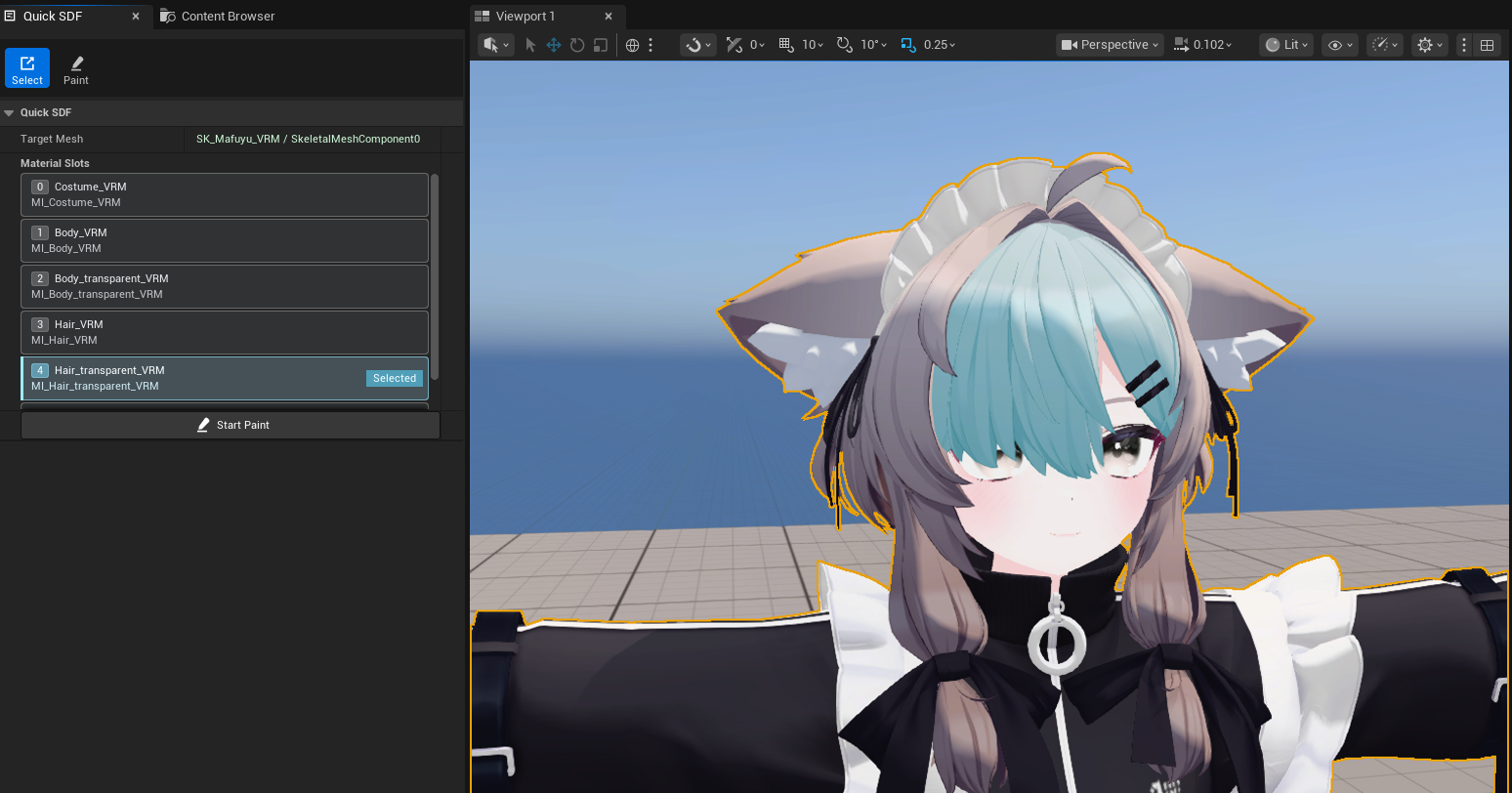
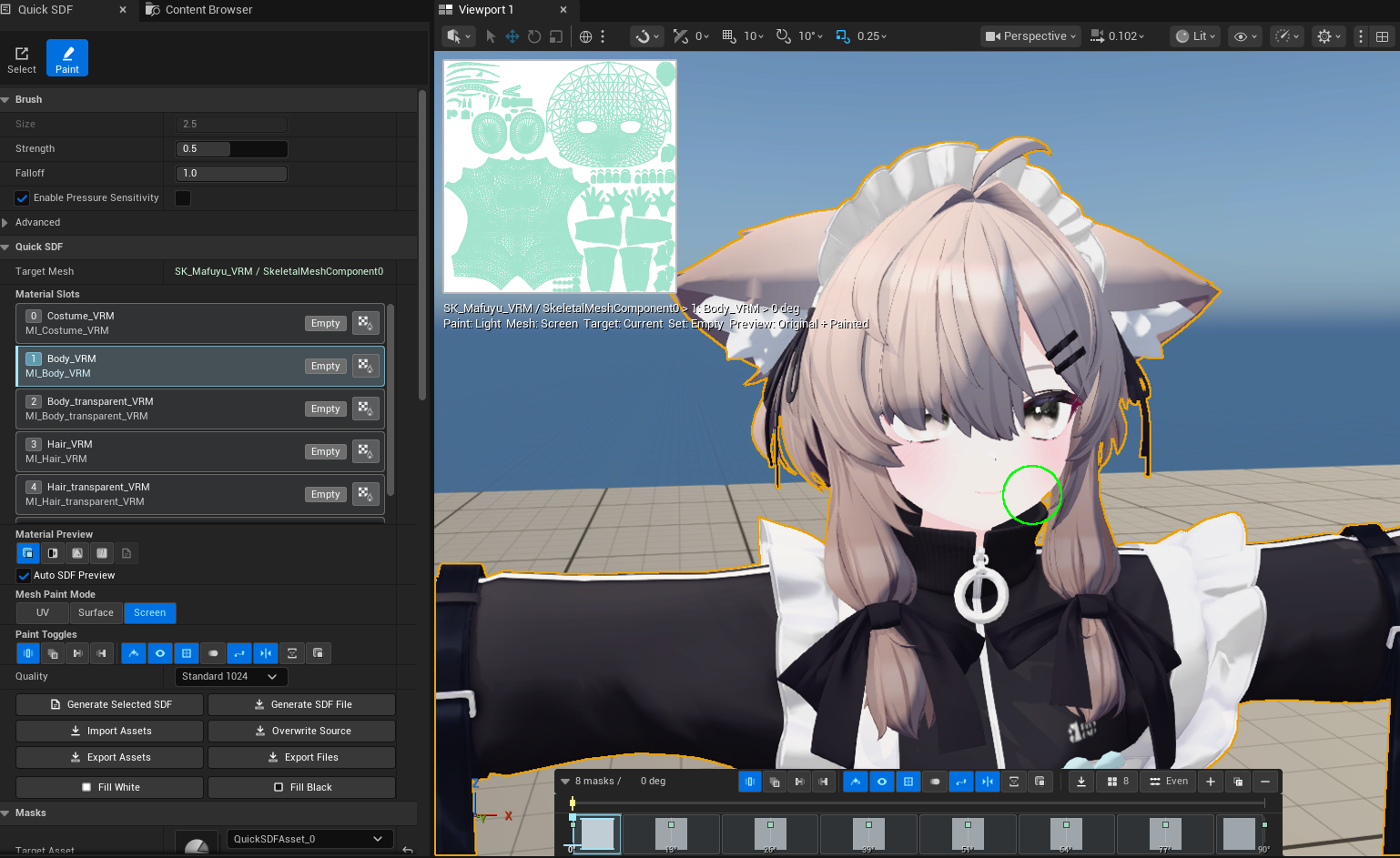

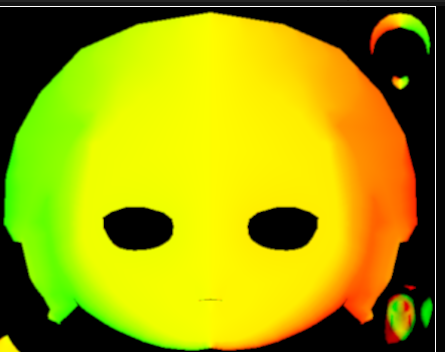
Screenshot character model credit: 真冬 Mafuyu / Original 3D Model by ぷらすわん. Character design and 3D modeling: 有坂みと.
Upgrade Notes
- The plugin descriptor now reports
VersionNameas1.0.0and is no longer marked as beta. - This release does not intentionally change the public C++ API, existing property names, enum names, shortcuts, or
UQuickSDFAssetsaved format. - Existing preview assets should continue to load through the current legacy-to-texture-set migration path.
- The supported target is UE 5.7.x. Treat UE 5.8+ as unverified until a later release explicitly adds it to the tested matrix.
- The attached Win64 binary is for the current custom UE 5.7-based editor build. Rebuild from source for Launcher UE or any other engine build.
- GPU JFA shader files remain in the repository, but the v1.0 user-facing generation flow uses the CPU
FSDFProcessorpath.
Release Blockers Closed
- The final SDF output channel layout and UV-island mirror behavior are documented for the current CPU path.
- Generated SDF preview is documented as using the same exported threshold-map layout as the saved texture.
- Timeline seek/keyframe interaction is documented as split into separate lanes, with status badges kept hit-test invisible so they do not block selection, drag, import, or seek behavior.
- Select/prep mode no longer hides mesh sections on entry; Paint mode applies slot isolation only after the artist starts painting.
- Active material slots are visible through row
Selectedstate and a cyan viewport overlay in Select mode. - Timeline keyframe drag now keeps the seek cursor and preview light synchronized with the dragged key.
- Paint mode supports
Ffocus on the current brush hit, whileCtrl+Fremains brush resize. - Preview/Beta status wording has been removed from release-facing documentation.
- Troubleshooting no longer lists preview-only SDF direction risk or thumbnail shifting as active v1.0 defects.
Known Limitations
- UV layout can affect the relationship between brush size and painted area, especially on heavily stretched or uneven UV islands. Use clean UVs or the 2D UV preview for precise edits.
- GPU JFA SDF generation is not enabled in the v1.0 user-facing generation flow.
- UE 5.8+ compatibility is intended but unverified for this release.
- Actor-level selection can still be ambiguous when multiple eligible mesh components overlap or cannot be resolved from the viewport hit. A richer component picker remains a post-1.0 roadmap item.
Verification Steps
- Open a C++ UE 5.7.4 project with the plugin enabled.
-
Build
sdfbuildEditor Win64 Development:Build.bat sdfbuildEditor Win64 Development -Project="C:\Users\condo\Downloads\sdfbuild\sdfbuild.uproject" -WaitMutex -NoHotReload -
Run the automation groups:
Automation RunTests QuickSDFTool Automation RunTests QuickSDFTool.Core Automation RunTests QuickSDFTool.Core.Timeline Automation RunTests QuickSDFTool.MonotonicGuard - Enter Quick SDF mode with no mesh selected and verify the Select/prep state does not show stale targets or slots.
- Pick Static Mesh and Skeletal Mesh targets from the viewport, including a Skeletal Mesh without a PhysicsAsset, and confirm the material slot row and cyan overlay follow the clicked surface.
- Start Paint, confirm the active slot is isolated by default, then disable Isolate Slot and verify full-mesh visibility returns.
- Paint from the mesh viewport and from the 2D UV preview.
- Press
Fwhile hovering a valid brush hit and verify the viewport focuses around the brush; pressFoff-mesh and verify UE selection focus still works. - Select material-slot rows, bake a selected slot, and confirm isolation and hit testing stay scoped to the selected slot.
- Drag timeline keyframes and confirm the seek cursor and preview light follow the drag.
- Exercise
Current,All,Before Current, andAfter Currentpaint target modes. - Generate SDF textures with
Off,Texture Flip,UV Island Channel Flip, andAuto, then inspect the generated preview and saved texture channels. - Validate Monotonic Guard, including an intentionally invalid mask sequence.
- Import and export masks, then verify source-overwrite protection.
- Save and reload a
UQuickSDFAsset, then confirm masks, texture sets, material-slot state, and generated texture references survive reload.
Release Assets
QuickSDFTool-v1.0.0-CustomUE57-Win64.zip: packaged Win64 editor plugin build for the current custom UE 5.7-based verification editor. This binary is not advertised as Launcher UE compatible.- Source archive generated by GitHub from the
v1.0.0tag.
Packaging Checklist
-
Run
RunUAT.bat BuildPluginto package the plugin intoC:\tmp\QuickSDFTool-v1.0.0-CustomUE57-Win64. With the current precompiled custom UE 5.7-based editor distribution, use host-platform packaging becauseUnrealGametargets are not supported:RunUAT.bat BuildPlugin -Plugin="C:\Users\condo\Downloads\github\QuickSDFTool\QuickSDFTool.uplugin" -Package="C:\tmp\QuickSDFTool-v1.0.0-CustomUE57-Win64" -HostPlatforms=Win64 -NoTargetPlatforms -Rocket - Zip the packaged plugin directory as
QuickSDFTool-v1.0.0-CustomUE57-Win64.zip. - Install the zip into a clean C++ project using the same custom UE 5.7-based editor build.
- Rebuild the host project, enable the plugin, restart the editor, and repeat the shortest paint-to-SDF workflow.