
Development Notes
This page collects implementation and maintenance notes that are useful for contributors and release maintainers.
Architecture
QuickSDFTool/
|-- Content/
|   |-- Materials/        # Preview and toon materials
|   |-- Textures/         # Default textures
|   |-- Widget/           # UMG widget blueprints
|-- Shaders/
|   |-- Private/
|       |-- JumpFloodingCS.usf
|       |-- QuickSDFFastPreview.usf
|-- Source/
    |-- QuickSDFTool/              # Runtime module and UQuickSDFAsset
    |-- QuickSDFToolEditor/        # Editor Mode, paint tool, timeline, processor
    |-- QuickSDFToolShaders/       # Compute shader binding
| Module | Type | Key Dependencies |
|---|---|---|
QuickSDFTool |
Runtime | Core, CoreUObject, Engine, RenderCore, RHI |
QuickSDFToolEditor |
Editor | InteractiveToolsFramework, EditorInteractiveToolsFramework, GeometryCore, DynamicMesh, MeshDescription, ModelingComponents, MeshConversion, EditorSubsystem, UMG, Slate, LevelEditor, PropertyEditor, MaterialBaking, DesktopPlatform, ImageWrapper, AssetRegistry |
QuickSDFToolShaders |
Runtime / PostConfigInit |
Core, CoreUObject, Engine, RenderCore, RHI, Projects |
Editor Code Layout
UQuickSDFAssetuses the activeFQuickSDFTextureSetDataas the primary source for editable masks, resolution, UV channel, and final SDF texture data. Legacy top-level fields are migrated on load on a best-effort basis.UQuickSDFPaintToolis the Interactive Tools Framework facade for lifecycle, input routing, and UI commands. Paint state, undo changes, mask utilities, SDF helpers, asset selection, and render target support live in focused private helpers.- Windows pen-display/tablet input is handled inside the editor module without engine changes.
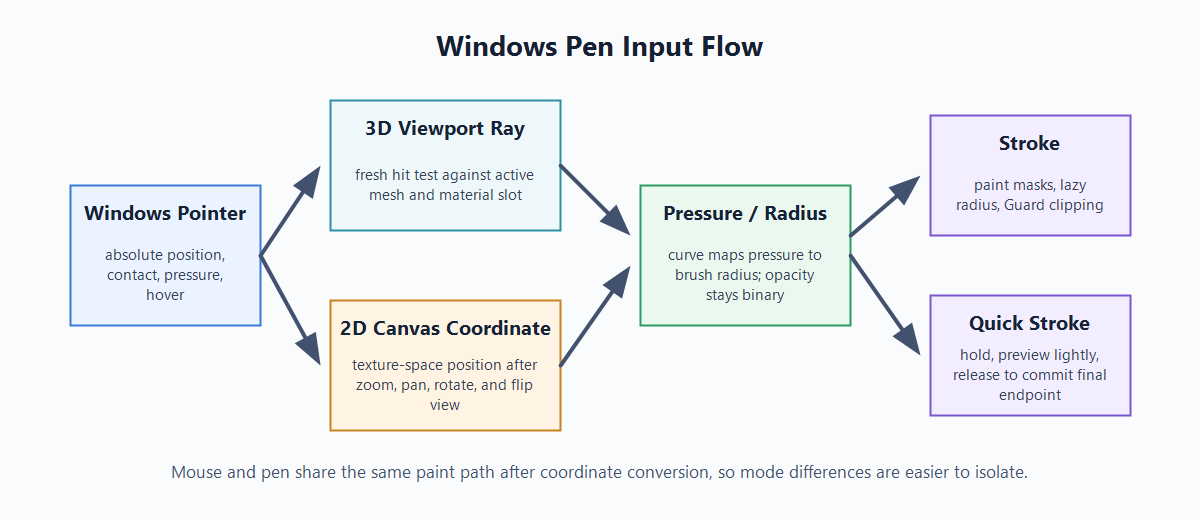
QuickSDFEditorModecaptures pen pointer position, contact, and pressure, whileUQuickSDFPaintToolandSQuickSDFPaintCanvasconvert the current absolute pointer position into fresh 3D viewport rays or 2D Canvas coordinates. - Quick Stroke is a shared paint workflow rather than a canvas-only path. Hold detection uses Move Tolerance and Hold Time; preview updates are kept lightweight during movement, and release commits the final stroke endpoint.
- Live SDF preview is isolated in
QuickSDFPaintToolLivePreview.cppand renders throughQuickSDFFastPreviewRendering. It owns only transient render targets and never replaces the saved final SDF texture. - Timeline keyframe rendering is split from the main timeline widget. Timeline range/key status calculations live in
QuickSDFTimelineStatusso range highlighting, badges, and tooltips can be tested without Slate. - Mask import validation is handled by a Slate-independent import model so the UI and import rules can evolve independently.
- Developer automation tests cover default angles, angle-name parsing, SDF edge cases, channel packing, UV-island mirror application, asset migration, mask import model validation,
TimelineRangeStatus,TimelineKeyStatus, and Monotonic Guard behavior.
How It Works
- Paint: for each light angle, paint a binary mask on the mesh or 2D Canvas.
- SDF: convert each mask to a signed distance field.
- Interpolate: find transitions between neighboring masks and derive threshold value
T. - Composite: automatically choose Monopolar or Bipolar output and pack values into RGBA channels:
- Monopolar: symmetric shadow behavior, or separate 0-90 / 90-180 values when the selected symmetry mode generates a second half.
- Bipolar: asymmetric shadow enter/exit values are generated in the legacy combined field, then exported with an R/A/B/G swizzle so the final texture keeps the expected shader layout and the B channel remains the 0-90-side value.
- UV Island Channel Flip: starts from the 0-90 combined field, fills the 90-180 channels by island-local mirrored sampling, and exports the result as the same RGBA16F / HDR texture format used by normal 0-180 maps.
- Export: save the final threshold map as a 16-bit half-float texture.
Live SDF is a preview-only branch: paint masks are downsampled to the selected transient preview resolution, GPU JFA produces an approximate threshold map, and the preview material consumes that render target. Final generation remains on the CPU path so saved textures keep the high-quality output behavior.
Development Verification
The current development target is UE 5.7.x. For local verification, build a C++ host project with the plugin enabled, then run the QuickSDFTool automation test group when test coverage is required.
Useful verification commands in the Unreal Editor command line or Session Frontend:
Automation RunTests QuickSDFTool
Automation RunTests QuickSDFTool.Core.Timeline
Automation RunTests QuickSDFTool.Core
Automation RunTests QuickSDFTool.MonotonicGuard
The v1.0 release candidate should be validated against sdfbuildEditor Win64 Development, focused timeline automation coverage, QuickSDFTool.Core, and the Monotonic Guard tests.
Manual input verification should include mouse painting plus Windows pen-display/tablet hover, pressure, stroke start/drag/release, 2D Canvas window move/resize behavior, Quick Stroke in 2D Canvas and 3D Paint, and Ctrl + F brush resizing.
Documentation Images
Generated concept diagrams live in docs/images/ and may be updated without a UE editor session:
quick-sdf-authoring-pipeline.png: Select -> Paint -> Timeline -> SDF generation -> Toon material.quick-sdf-pen-input-flow.png: Windows pointer -> 3D viewport ray / 2D Canvas coordinate -> pressure/radius -> stroke / Quick Stroke.quick-sdf-pressure-curve.png: Pen Pressure Curve response for brush radius.quick-sdf-symmetry-flow.png: Off / Texture Flip / UV Island Channel Flip / Auto mode differences.quick-sdf-guard-flow.png: Monotonic Guard transition detection and clipping.
Real UI screenshots must come from an actual UE editor session, because generated diagrams cannot prove widget state or pen alignment:
quick-sdf-select-active-slot.png: Select mode active material slot overlay.quick-sdf-paint-screen-mode.png: Paint mode Screen Projection with green brush circle, UV preview, and active slot context.quick-sdf-timeline.png: Timeline thumbnails / seek lane / keyframe lane / status badges.quick-sdf-sdf-preview.png: Generated SDF preview.quick-sdf-2d-canvas-pen-paint.gif: Existing 2D Canvas pen-painting animation.quick-sdf-2d-canvas-pen-paint.png: Static 2D Canvas pen capture with brush circle aligned to the stroke.quick-sdf-pen-screen-hover.png: 3D Screen mode pen hover with the green brush circle.quick-sdf-quick-stroke-2d.png: Quick Stroke following after hold in the 2D Canvas.quick-sdf-quick-stroke-3d.png: Quick Stroke following lightly in 3D Paint.quick-sdf-advanced-pen-pressure.png: Advanced settings showing Pen Pressure and Pen Pressure Curve.quick-sdf-ctrl-f-pen-resize.png: OptionalCtrl + Fpen brush resize capture.
Repository Setup Checklist
For maintainers preparing the GitHub page:
- Add these repository topics:
unreal-engine,ue5,toon-shading,cel-shading,sdf,editor-plugin,technical-art. - Upload
.github/assets/social-preview.svgas the GitHub Social Preview image, or export it to PNG first. - Create releases using the matching files under release notes.