
Development Notes
このページは、contributor と release maintainer 向けの実装 / 保守メモです。
Architecture
QuickSDFTool/
|-- Content/
|   |-- Materials/        # Preview and toon materials
|   |-- Textures/         # Default textures
|   |-- Widget/           # UMG widget blueprints
|-- Shaders/
|   |-- Private/
|       |-- JumpFloodingCS.usf
|       |-- QuickSDFFastPreview.usf
|-- Source/
    |-- QuickSDFTool/              # Runtime module and UQuickSDFAsset
    |-- QuickSDFToolEditor/        # Editor Mode, paint tool, timeline, processor
    |-- QuickSDFToolShaders/       # Compute shader binding
| Module | Type | Key Dependencies |
|---|---|---|
QuickSDFTool |
Runtime | Core, CoreUObject, Engine, RenderCore, RHI |
QuickSDFToolEditor |
Editor | InteractiveToolsFramework, EditorInteractiveToolsFramework, GeometryCore, DynamicMesh, MeshDescription, ModelingComponents, MeshConversion, EditorSubsystem, UMG, Slate, LevelEditor, PropertyEditor, MaterialBaking, DesktopPlatform, ImageWrapper, AssetRegistry |
QuickSDFToolShaders |
Runtime / PostConfigInit |
Core, CoreUObject, Engine, RenderCore, RHI, Projects |
Editor Code Layout
UQuickSDFAssetは activeFQuickSDFTextureSetDataを editable masks、resolution、UV channel、final SDF texture data の主な source として使います。legacy top-level fields は load 時に best-effort で migrate されます。UQuickSDFPaintToolは lifecycle、input routing、UI commands の Interactive Tools Framework facade です。paint state、undo changes、mask utilities、SDF helpers、asset selection、render target support は focused private helpers に分かれています。- Windows pen-display / tablet input は engine change なしで editor module 内に実装されています。
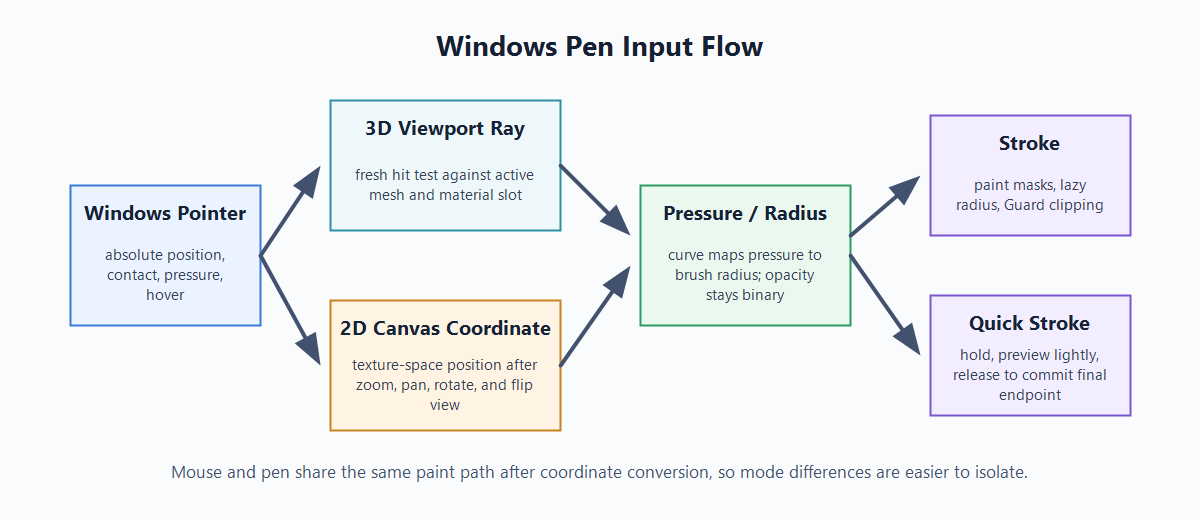
QuickSDFEditorModeが pen pointer position、contact、pressure を capture し、UQuickSDFPaintToolとSQuickSDFPaintCanvasが current absolute pointer position を 3D viewport ray または 2D Canvas coordinates へ変換します。 - Quick Stroke は canvas 専用ではなく共有の paint workflow です。hold detection は Move Tolerance と Hold Time を使い、移動中 preview update は軽量化され、release で最終 endpoint を commit します。
- Live SDF preview は
QuickSDFPaintToolLivePreview.cppに分離され、QuickSDFFastPreviewRenderingを通じて render されます。transient render targets だけを所有し、保存済み final SDF texture を置き換えません。 - Timeline keyframe rendering は main timeline widget から分離されています。range highlighting、badges、tooltips を Slate なしで test できるよう、Timeline range/key status calculations は
QuickSDFTimelineStatusにあります。 - Mask import validation は Slate-independent import model で扱われ、UI と import rules を独立して進化させられます。
- Developer automation tests は default angles、angle-name parsing、SDF edge cases、channel packing、UV-island mirror application、asset migration、mask import model validation、
TimelineRangeStatus、TimelineKeyStatus、Monotonic Guard behavior を cover します。
How It Works
- Paint: light angle ごとに mesh または 2D Canvas 上で binary mask を paint します。
- SDF: 各 mask を signed distance field に変換します。
- Interpolate: 隣接 mask 間の transition を見つけ、threshold value
Tを導出します。 - Composite: Monopolar または Bipolar output を自動選択し、RGBA channels に pack します。
- Monopolar: symmetric shadow behavior、または selected symmetry mode が second half を生成する場合の 0-90 / 90-180 separate values。
- Bipolar: asymmetric shadow enter/exit values を legacy combined field で生成し、R/A/B/G swizzle で export します。final texture は expected shader layout を保ち、B channel は 0-90 side value のままです。
- UV Island Channel Flip: 0-90 combined field から開始し、90-180 channels を island-local mirrored sampling で埋め、通常の 0-180 maps と同じ RGBA16F / HDR texture format で export します。
- Export: final threshold map を 16-bit half-float texture として保存します。
Live SDF は preview 専用 branch です。paint masks を selected transient preview resolution へ downsample し、GPU JFA が approximate threshold map を生成し、preview material がその render target を使います。final generation は CPU path のままなので、保存 texture は高品質出力を維持します。
Development Verification
現在の development target は UE 5.7.x です。local verification では、plugin を有効にした C++ host project を build し、必要に応じて QuickSDFTool automation test group を実行します。
Unreal Editor command line または Session Frontend で使う verification commands:
Automation RunTests QuickSDFTool
Automation RunTests QuickSDFTool.Core.Timeline
Automation RunTests QuickSDFTool.Core
Automation RunTests QuickSDFTool.MonotonicGuard
v1.0 release candidate は sdfbuildEditor Win64 Development、focused timeline automation coverage、QuickSDFTool.Core、Monotonic Guard tests で検証してください。
manual input verification には、mouse painting、Windows pen-display/tablet hover、pressure、stroke start/drag/release、2D Canvas window move/resize behavior、2D Canvas と 3D Paint の Quick Stroke、Ctrl + F brush resizing を含めます。
Documentation Images
生成可能な概念図は docs/images/ に置きます。UE editor session がなくても更新できます。
quick-sdf-authoring-pipeline.png: Select -> Paint -> Timeline -> SDF generation -> Toon material。quick-sdf-pen-input-flow.png: Windows pointer -> 3D viewport ray / 2D Canvas coordinate -> pressure/radius -> stroke / Quick Stroke。quick-sdf-pressure-curve.png: Pen Pressure Curve の brush radius response。quick-sdf-symmetry-flow.png: Off / Texture Flip / UV Island Channel Flip / Auto mode の違い。quick-sdf-guard-flow.png: Monotonic Guard の transition detection と clipping。
実機 UI screenshot は実際の UE editor session から撮影してください。生成図では widget state や pen alignment を証明できません。
quick-sdf-select-active-slot.png: Select mode active material slot overlay。quick-sdf-paint-screen-mode.png: Paint mode Screen Projection の緑ブラシ円、UV preview、active slot context。quick-sdf-timeline.png: Timeline thumbnails / seek lane / keyframe lane / status badges。quick-sdf-sdf-preview.png: Generated SDF preview。quick-sdf-2d-canvas-pen-paint.gif: 既存の 2D Canvas pen-painting animation。quick-sdf-2d-canvas-pen-paint.png: brush circle と stroke が一致している 2D Canvas pen static capture。quick-sdf-pen-screen-hover.png: 3D Screen mode pen hover の緑ブラシ円。quick-sdf-quick-stroke-2d.png: 2D Canvas で hold 後に Quick Stroke が追従している状態。quick-sdf-quick-stroke-3d.png: 3D Paint で Quick Stroke が軽く追従している状態。quick-sdf-advanced-pen-pressure.png: Pen Pressure と Pen Pressure Curve を表示した Advanced settings。quick-sdf-ctrl-f-pen-resize.png: 任意のCtrl + Fpen brush resize capture。
Repository Setup Checklist
GitHub page を準備する maintainer 向け checklist:
- repository topics に
unreal-engine、ue5、toon-shading、cel-shading、sdf、editor-plugin、technical-artを追加します。 .github/assets/social-preview.svgを GitHub Social Preview image として upload します。必要なら先に PNG へ export します。- release は release notes 配下の対応ファイルを使って作成します。